
New Year AI Photo Editing Prompts: 7 Copy-Paste Gemini & ChatGPT Prompts
My New Year photos never look the way I remember the night. On 31 December, it is dark, everyone is moving, and my phone either makes the fireworks too bright or my face too dark. Last year I stopped trying to fix the photos by hand and started using Gemini and ChatGPT instead. I upload one clear photo of myself, paste a prompt, and get back a New Year portrait that actually looks like me — on a rooftop under fireworks, or at home with my family at midnight.
New Year night is Thursday, 31 December 2026, and the first morning of 2027 is Friday, 1 January. That one night gives you three very different photos: the countdown at midnight, the party with friends, and the quiet morning after. I wrote these 7 prompts to cover all three, for solo portraits, couples, friends, and family. You upload your photo, copy one prompt, and paste it into Gemini or ChatGPT. Every prompt keeps your face recognizable and focuses on realistic fireworks, warm party light, and a photographic feel — not a cartoon filter.
This is a New Year article, not a Christmas article. There are no Christmas trees, ornaments, or holiday gifts here — just fireworks, midnight celebrations, elegant party clothes, and the fresh feeling of a new year.
Quick Pick: Which New Year Prompt Should You Use?
| Prompt | Best for | Mood |
|---|---|---|
| 1. Fireworks Rooftop Portrait | Solo, DP and posts | Cinematic, celebratory |
| 2. Elegant New Year Party Portrait | Solo, striking DP | Glamorous, refined |
| 3. New Year Couple Under Fireworks | Couples, New Year posts | Romantic, warm |
| 4. Cozy Midnight Countdown at Home | Family, home posts | Warm, intimate |
| 5. Sparkling City Night Walk | Solo, evening posts | Lively, glowing |
| 6. Friends Countdown Celebration | Friends, group posts | Joyful, energetic |
| 7. New Year Morning Fresh Start Portrait | Solo, New Year Day posts | Calm, hopeful |
Gemini or ChatGPT — Which One Should I Use for Night and Fireworks Shots?
Night photos are the hardest ones for AI, so this choice matters more for New Year than for any daytime festival. Fireworks blow out into white blobs, faces go dark, and the background turns into black space. Here is what I have found by trying the same prompt in both tools.
Gemini, from Google, is usually better at keeping a single face consistent in the dark. If your main worry is “will it still look like me at midnight”, start with Gemini. ChatGPT, from OpenAI, is often stronger on the scene itself — the glow of the fireworks, the party lights, the texture of an evening outfit come out richer. If your main worry is “will the night feel like a celebration”, try ChatGPT.
What I do is simple: I generate the same prompt in Gemini first, and if the face is right but the fireworks look flat, I try the same prompt in ChatGPT and pick the better one. Both tools need the same thing from you — a clear original photo taken in decent light, and the full prompt in one message. Do not upload a dark, blurry midnight selfie and expect the AI to rescue it. A clear daytime or well-lit indoor photo works better than the shaky photo you took at 11:55 pm. And do not mix prompts: one prompt at a time, one result at a time.
7 New Year AI Photo Editing Prompts
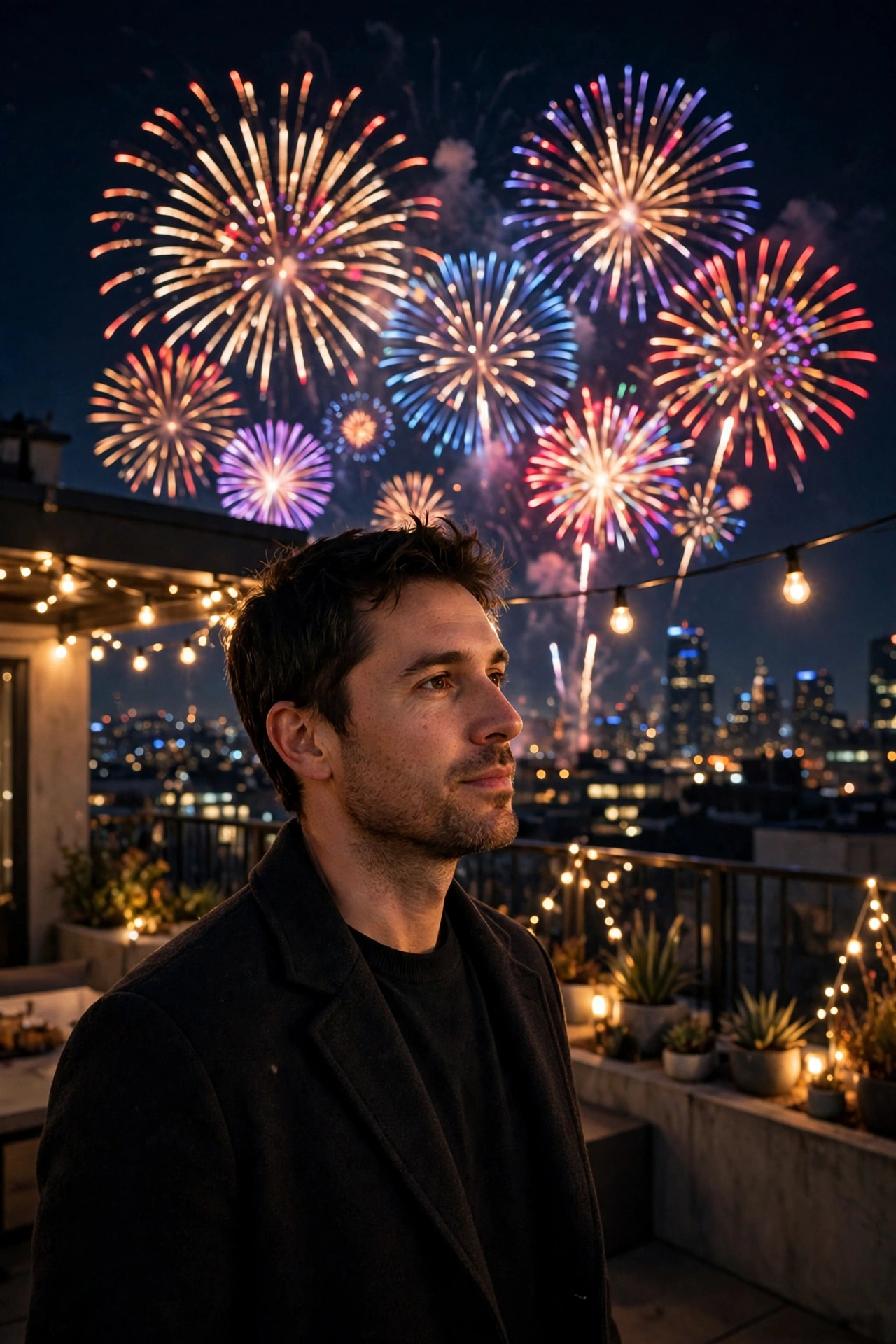
1. Fireworks Rooftop Portrait
The classic New Year photo: you on a rooftop at midnight, fireworks lighting the sky behind you. This is the one I use for my own DP on 31 December night.
AI Prompt:
Edit my uploaded photo into a realistic New Year portrait on a rooftop at midnight. Preserve my actual face, facial features, natural skin tone, and identity exactly. Dress me in a smart dark party outfit and place me standing on a rooftop terrace as colorful fireworks burst in the night sky behind me, with a softly blurred city skyline below. Use warm party lighting mixed with fireworks light, realistic skin texture, and a vertical 9:16 composition. Make it look like a professional New Year photograph, not an illustration. No text, no logo, no watermark.
Best for: New Year DP, midnight posts, and profile pictures.
Customize it: Change the outfit color to deep red or midnight blue, but keep the fireworks softly blurred so your face stays the focus.
2. Elegant New Year Party Portrait
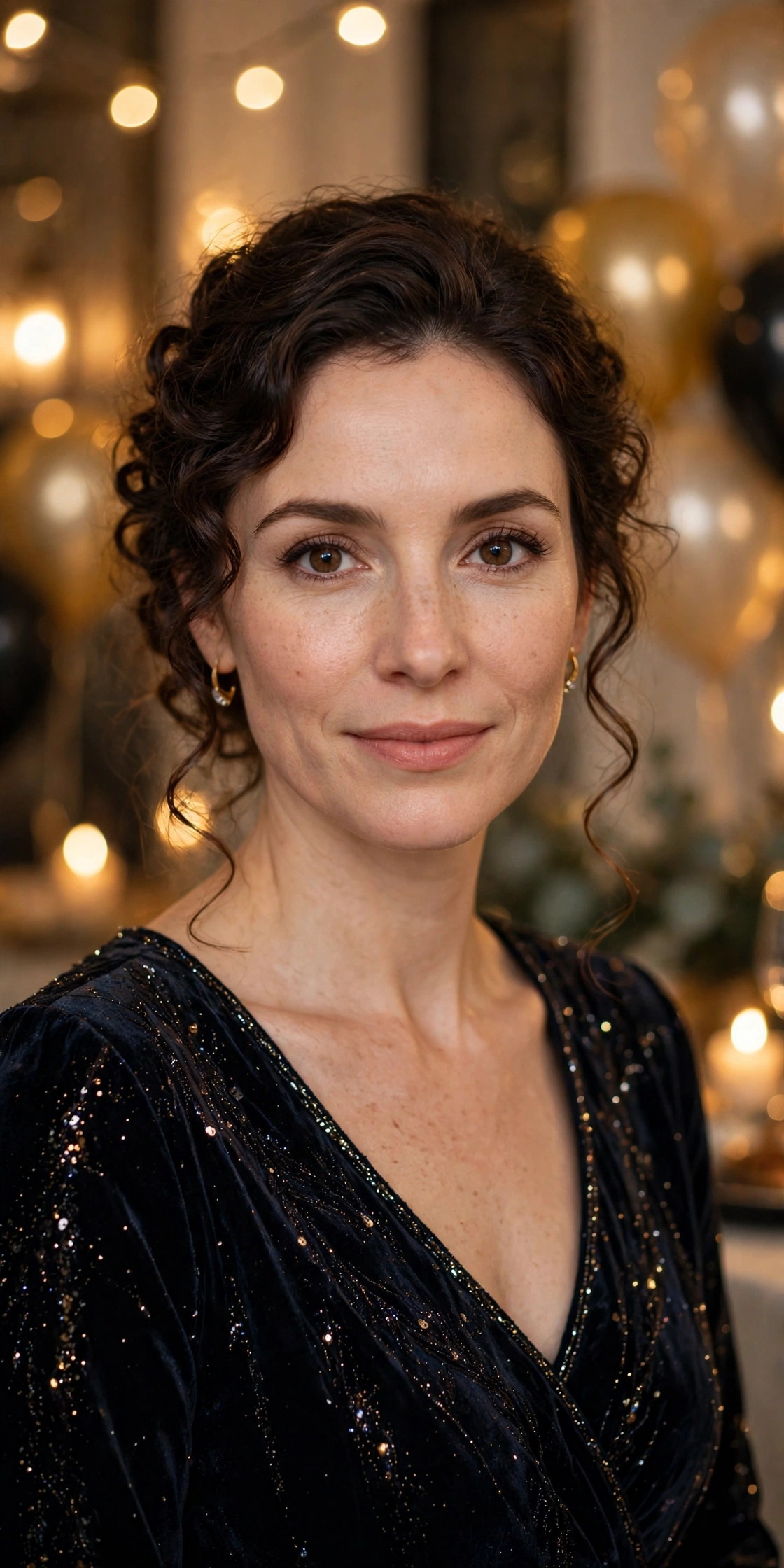
For a polished, editorial-style portrait indoors — formal clothes, golden light, and a party softly glowing behind you.
AI Prompt:
Edit my uploaded photo into a realistic elegant New Year party portrait indoors. Preserve my actual face, facial features, skin tone, and identity exactly. Dress me in an elegant formal party outfit with subtle sparkle and place me at an indoor New Year party with warm golden lights and blurred balloons and decorations behind me. Use soft golden party lighting, realistic fabric texture, natural skin texture, and a vertical 9:16 composition. Make it look like a candid editorial photograph. No text, no logo, no watermark.
Best for: Striking DP, party posts, and New Year albums.
Customize it: Keep the background blur strong; a busy party background distracts from your face.
3. New Year Couple Under Fireworks
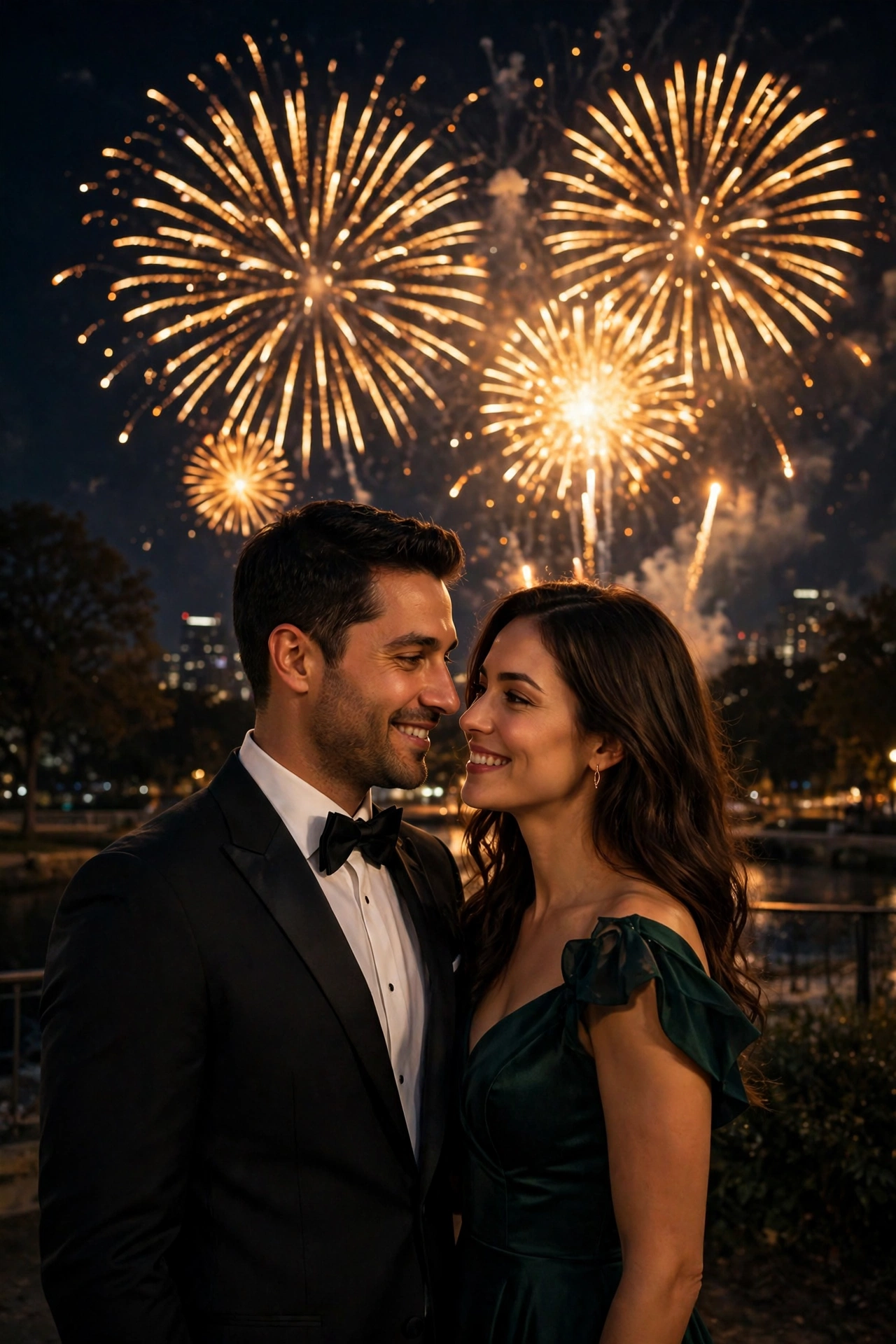
Couple photos are the hardest to get right in AI, because two faces have to stay natural. This prompt locks both faces first, so upload a photo where both faces are clearly visible and facing the camera.
AI Prompt:
Edit our uploaded couple photo into a realistic New Year portrait under fireworks. Preserve both faces, facial features, natural skin tones, and identities exactly, without merging or beautifying either face. Dress them in elegant evening outfits and place them standing close together outdoors at midnight as fireworks light the sky behind them, smiling gently at the camera. Use warm fireworks lighting, realistic skin texture, natural hand positions, and a vertical 9:16 composition. No text, no logo, no watermark.
Best for: Couple DP, New Year posts, and anniversary-style photos.
Customize it: Ask for a candid version by adding: “Make them look at each other and laugh naturally, like a candid photo.”
4. Cozy Midnight Countdown at Home
For a quiet, warm celebration indoors — family or close loved ones, soft light, and the feeling of counting down together. Most of us in India count down at home with parents and children, not at a club, so this is the prompt I recommend for family photos.
AI Prompt:
Edit my uploaded photo into a realistic cozy New Year countdown portrait at home. Preserve my actual face, facial features, skin tone, and identity exactly. Dress me in a comfortable festive outfit and place me in a warmly lit living room at midnight with soft party lights, balloons, and a window showing fireworks in the distance. Use soft warm indoor light, realistic skin texture, and a vertical 9:16 composition. Make it look like a candid home photograph. No text, no logo, no watermark.
Best for: Family posts, cozy DP, and New Year greetings.
Customize it: Add a warm throw or a festive sweater, but keep the window fireworks subtle so the indoor warmth stays the main feeling.

5. Sparkling City Night Walk
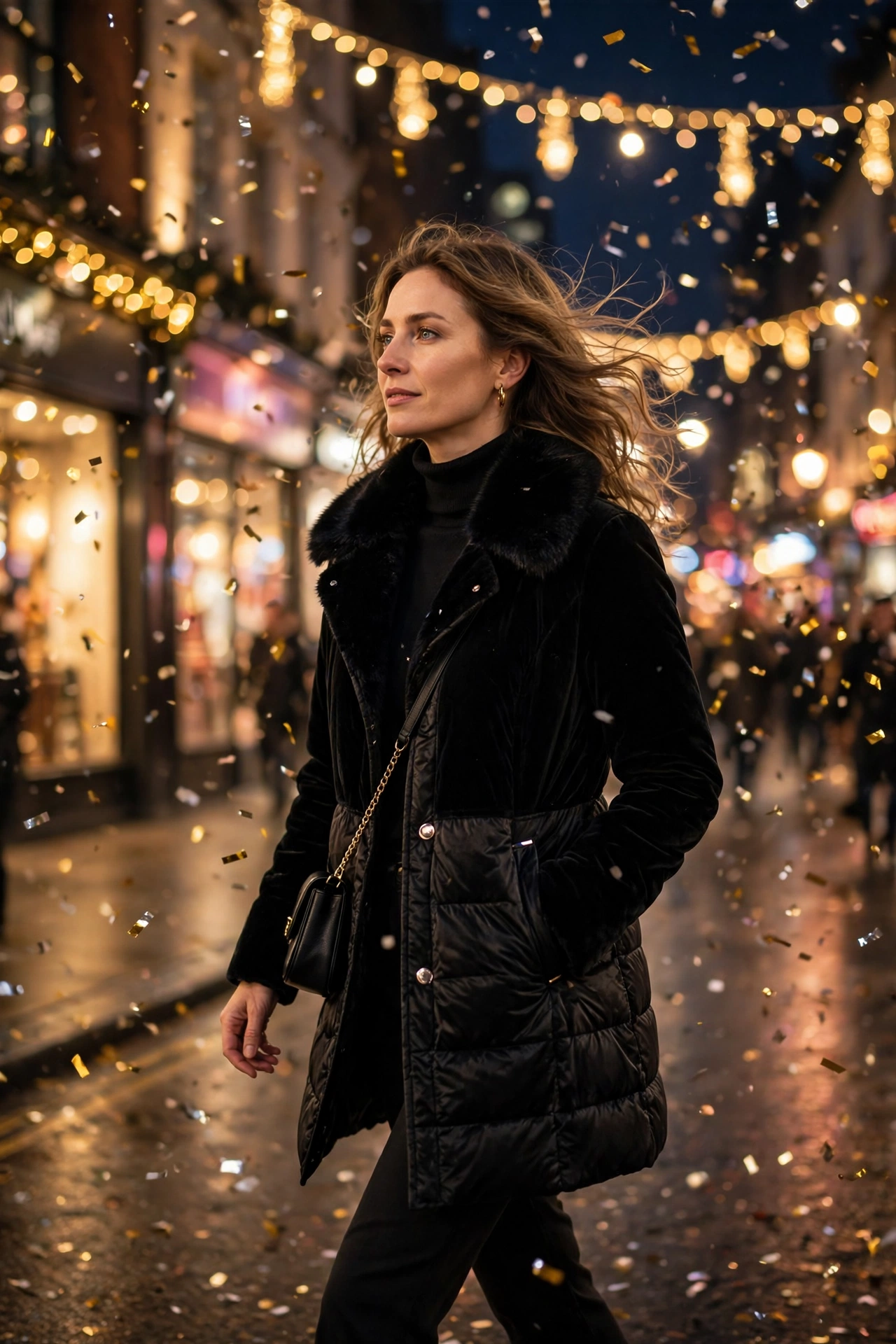
A glowing evening photo: you walking through a city dressed for New Year, lights and fireworks reflected around you. I like this one for the evening of 31 December, before midnight, when the streets are lit up and the night is just starting.
AI Prompt:
Edit my uploaded photo into a realistic New Year night portrait on a city street. Preserve my actual face, hairstyle, skin tone, and identity exactly. Dress me in a stylish winter party coat over an evening outfit and place me walking on a city street at night with festive lights, gentle confetti in the air, and softly blurred shop lights behind me. Use warm night lighting, realistic confetti, natural skin texture, and a vertical 9:16 composition. Make it look like a candid evening photograph. No text, no logo, no watermark.
Best for: Evening posts, city-style New Year photos, and seasonal stories.
Customize it: Keep one light source in focus — the street lights or the fireworks glow — and let the rest blur softly. If you are in a warmer city like Mumbai or Chennai, you can ask for a light jacket instead of a winter coat.
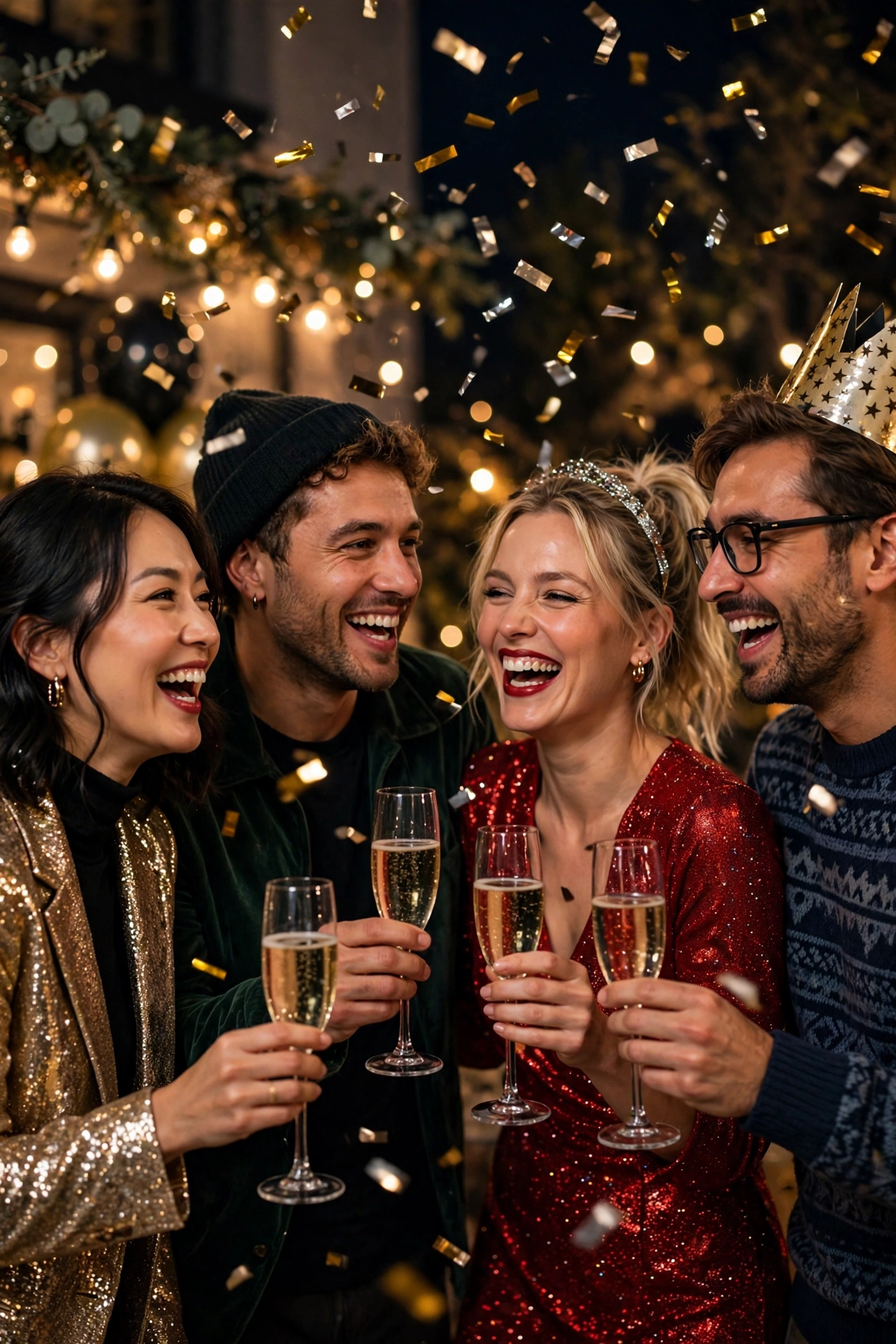
6. Friends Countdown Celebration
A joyful group photo for friends ringing in the New Year together, with confetti, laughter, and midnight energy. Upload a group photo where every face is clear and well lit — crowded or blurry group photos are the most common reason a group edit looks wrong.
AI Prompt:
Edit our uploaded group photo into a realistic New Year friends celebration portrait. Preserve every face, facial feature, natural skin tone, and identity exactly, without merging faces. Dress everyone in festive party outfits and place them together at a New Year party at midnight with confetti in the air, warm party lights, and softly blurred decorations behind them, all smiling and celebrating naturally. Use warm party lighting, realistic skin texture, natural poses, and a vertical 9:16 composition. No text, no logo, no watermark.
Best for: Friends posts, group DP, and New Year greetings.
Customize it: Upload a group photo where every face is clear and well lit; crowded or blurry group photos are the most common reason a group edit looks wrong.
7. New Year Morning Fresh Start Portrait
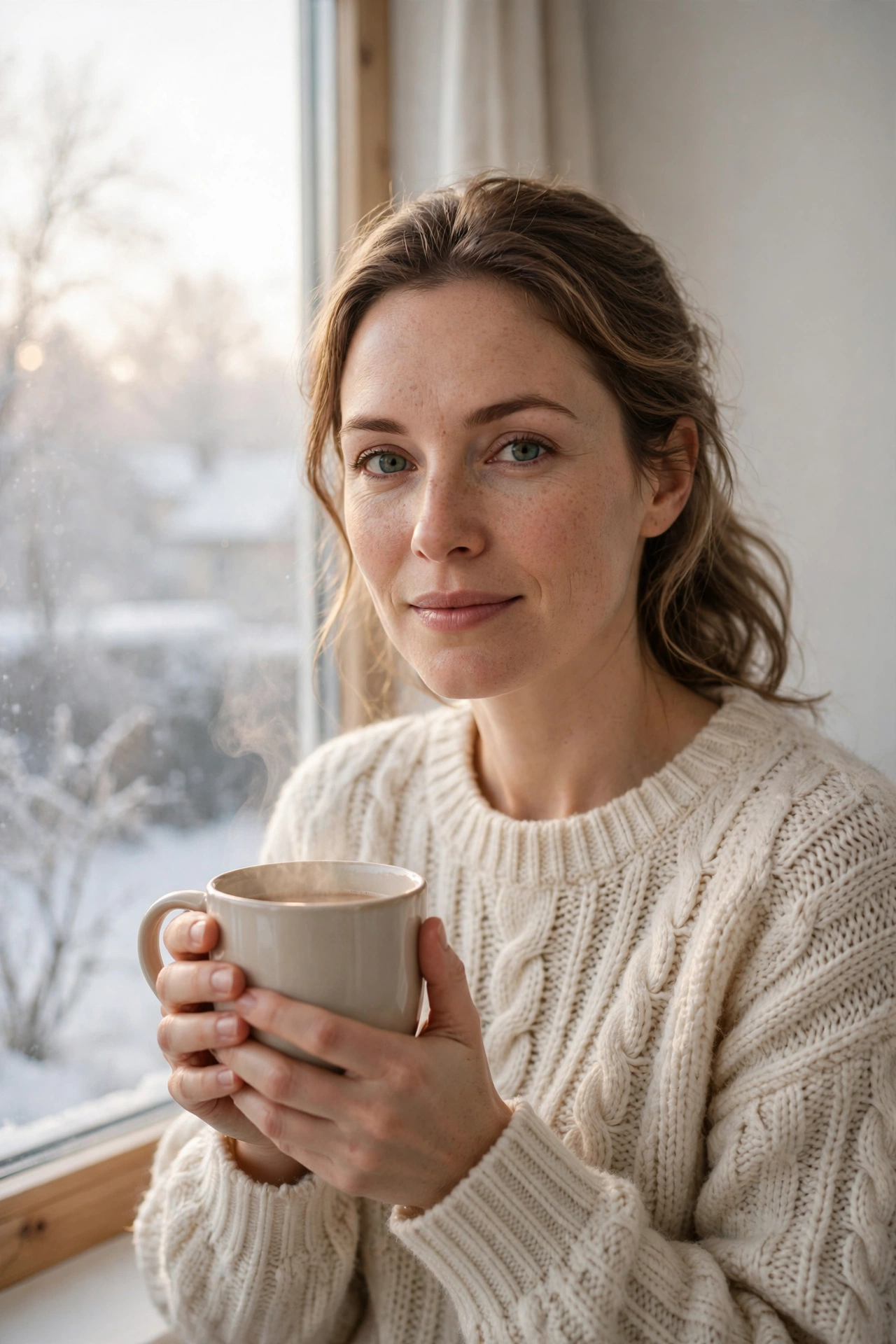
A calm photo for New Year morning — soft daylight, a warm drink, and the quiet hope of a fresh start. I use this one on 1 January, after the noise of the night. It is the only prompt in this list that works in daylight, and it makes a good first post of the year.
AI Prompt:
Edit my uploaded photo into a realistic New Year morning portrait. Preserve my actual face, hairstyle, skin tone, and identity exactly. Dress me in a cozy knit sweater and place me by a bright window on a fresh winter morning holding a warm drink, with soft morning light and a calm, uncluttered background. Use natural morning light, realistic knit texture, natural skin texture, and a vertical 9:16 composition. Make it look like a real morning photograph. No text, no logo, no watermark.
Best for: New Year Day posts, calm profile pictures, and fresh-start albums.
Customize it: Keep the morning light soft rather than harsh, and keep the background simple so the focus stays on you.
How to Use These New Year Prompts in Gemini or ChatGPT
- Choose a clear photo. A front-facing, well-lit photo works best. Avoid blurry photos or photos where your face is covered. Use the original from your gallery, not a WhatsApp-forwarded copy — WhatsApp reduces photo quality when you forward it.
- Open Gemini or ChatGPT and start a new image chat.
- Upload your photo first, then paste the full prompt in the same message.
- Keep one prompt at a time. Do not mix a rooftop look, a party look, and a couple look in one prompt.
- Generate, then refine. If the face looks slightly off, do not rewrite everything. Add one correction line, for example: “Keep my face exactly the same as the uploaded photo and make the lighting softer.”
If Your New Year Photo Looks Wrong, Fix It Like This
| Problem | Add this line |
|---|---|
| Face looks different | Keep my face, facial structure, and skin tone exactly the same as the uploaded photo. |
| Fireworks look fake | Use soft, realistic fireworks with natural glow, not flat bright blobs. |
| Photo looks too artificial | Use realistic skin texture, natural shadows, and soft light. Avoid plastic skin and over-smoothing. |
| Hands look wrong | Use natural hand positions with correct fingers and realistic proportions. |
| Background is too busy | Keep the background softly blurred and keep the focus on the person. |
| Colors look washed out | Use balanced party colors with warm skin tones against cool night tones. |
| Face is too dark in a night shot | Light the face with soft warm light from the front, and keep the fireworks behind, not in front of the face. |
Tips for a More Realistic New Year AI Photo
- Describe light, not just clothes. Fireworks light, golden party light, and soft morning light change the whole photo.
- Mention the ratio. Add “vertical 9:16” for a DP or reel, and a wider ratio only if you want a landscape card.
- Keep the fireworks soft. Gentle, blurred fireworks read as celebration faster than a harsh explosion, and they keep your face visible.
- Use a good photo, not a midnight photo. The AI keeps your face from the photo you upload. A clear photo taken earlier in the day gives a better midnight portrait than a dark selfie taken at the party.
- Test on WhatsApp first. A photo that looks good in the AI app can look dark as a WhatsApp DP. If it does, ask for slightly brighter warm light before posting.
- Do not promise a viral result. A good prompt improves the photo. Whether it goes viral also depends on timing, caption, and audience.
New Year in India — How I Use These Prompts for 31 December Night, the Family Countdown, and First-Morning Photos
New Year in India is not one kind of party. In my family, the evening starts at home — snacks, music, and everyone getting ready — then some of us go up to the terrace or the society rooftop at midnight, and the rest stay in the living room for the countdown. The next morning is slow: chai, a late breakfast, and the first photo of the year. I use different prompts for each part of that night.
For the terrace at midnight, I use Prompt 1, the Fireworks Rooftop Portrait. In most Indian cities, people watch fireworks from a rooftop or a balcony, not from a street. Generate it before the night starts, so you can post it right at midnight instead of waiting for the AI while everyone is celebrating.
For the countdown with family, I use Prompt 4, the Cozy Midnight Countdown at Home — parents, children, and grandparents together in the living room, the countdown on the TV, balloons in the corner, and fireworks far away through the window. If your family sends New Year wishes on the family WhatsApp group, this is the photo that gets the most replies, because it looks like your home, not a studio.
For friends, I use Prompt 6, the Friends Countdown Celebration, and I make it early in the evening. Group photos take the longest to get right, because every face has to stay natural. If you leave it until midnight, you will be fixing faces while everyone else is already posting.
For the morning after, I use Prompt 7, the New Year Morning Fresh Start Portrait, with a cup of chai. In North India — Delhi, Lucknow, Jaipur — late December mornings are genuinely cold, so the sweater in this prompt looks natural. In Mumbai or Chennai, where the morning is mild, I still keep the sweater, because it reads as a winter-morning look even if the weather outside is warm. Post this one on the morning of 1 January, when everyone is checking their phones for the first wishes of the year.
One practical thing: change your WhatsApp DP at midnight, not the next morning — most people in India see the DP change before they see the post. And keep the caption simple: “Happy New Year from our home” tells people more than a long caption does. You do not need a studio or a professional shoot for any of this. You need one clear photo, one prompt at a time, and ten minutes before the countdown.
FAQs
When is New Year 2027?
New Year night is Thursday, 31 December 2026, and New Year Day is Friday, 1 January 2027. These prompts are made for photos around that night and the morning after — DPs, family posts, and reels for the New Year weekend.
Can I use these New Year prompts in both Gemini and ChatGPT?
Yes. Both tools support photo upload and text prompts. In my experience, Gemini often keeps a single face consistent, while ChatGPT is also strong on party and indoor detail. For night and fireworks shots, try Gemini first if the face matters most to you, and ChatGPT if the glow and party detail matter most.
Will my face stay exactly the same?
Mostly, but no tool can guarantee 100% identity in every result. Night photos are harder than daytime photos, because the AI has to light a face in the dark. Use a clear, well-lit original photo and repeat the face-preservation line if the first result drifts.
Which New Year prompt is best for the midnight countdown?
Prompt 1, the Fireworks Rooftop Portrait, if you are on a terrace or rooftop, and Prompt 4, the Cozy Midnight Countdown at Home, if you are counting down with family indoors. Pick the one that matches where you actually are at midnight.
Which New Year prompt is best for a couple?
Prompt 3, the New Year Couple Under Fireworks, is made for two faces. Upload a clear photo where both faces are visible, and do not crop either face tightly.
My night photos always come out too dark. Will these prompts fix that?
The prompts ask for soft warm light on the face, which helps, but they cannot fix a dark uploaded photo. Upload a clear, well-lit photo taken earlier in the day, and let the prompt add the night scene around it. If the result is still dark, add the line from the fix-it table: “Light the face with soft warm light from the front.”
Can I use these photos as my WhatsApp DP?
Yes, that is what most people use them for. The 9:16 vertical ratio in every prompt is made for DPs and reels. Check the result as a small DP before posting — if the face looks dark at small size, regenerate with slightly brighter light. And change your DP at midnight, when most people are online, rather than the next morning.
Is it safe to upload my photo to an AI tool?
Upload only photos you are comfortable sharing with that tool, and check the tool’s privacy settings. Do not upload photos of other people without their permission.
For Readers in India
New Year in India is celebrated at home, on terraces, and in society gatherings — with family, friends, fireworks, and a lot of photos on WhatsApp. These prompts are written for that setting: a rooftop at midnight, a warm living room countdown, a city street in the evening, and a quiet morning with chai on 1 January. They work the same way whether you are in Delhi, Mumbai, Lucknow, or a small town — upload your photo, paste the prompt, and use the setting that matches your own celebration.
Originality and Privacy Note
These prompts were written originally for this site. They are not copied from another prompt site, and they do not copy any celebrity’s face or a movie scene. Results vary by tool and by photo, and no prompt can guarantee a viral result. Upload only your own photo, or a photo you have permission to edit.
Final Thoughts
A good New Year AI photo is not about adding every celebration element at once. It is about one clear look, warm light, and a face that still looks like you. That is what I kept coming back to while writing these prompts, and it is what I would check first in my own photo. My own plan for the night is simple: the rooftop portrait at midnight, the family countdown photo for the WhatsApp group, and the calm morning portrait on 1 January. Start with the Fireworks Rooftop Portrait or the Elegant New Year Party Portrait, then try the couple or friends version if you are posting for more than one person. Small changes — a different outfit color, softer light, or a simpler background — usually give a better result than a completely new prompt.
Read more: Christmas AI Photo Editing Prompts, Winter AI Photo Editing Prompts, Thanksgiving AI Photo Editing Prompts, and Gemini Couple Photo Editing Prompts.
One Comment