
Vidaai AI Photo Editing Prompts 2026: 7 Copy-Paste Gemini & ChatGPT Prompts
I have been to many weddings in my life, and I have learned one thing: the photographs nobody forgets are not the ones from the stage. They are the vidaai ones. The last hug at the doorway. The bride throwing rice over her shoulder without looking back. Her father’s hand on her shoulder, holding on for one more second. Those are the pictures a family returns to for years, and I wanted my own vidaai photos to look the way the moment felt — soft, tender, and real.
That is why I made these prompts. I tried turning my own wedding photos into gentle AI edits, and I learned quickly that vidaai is the hardest moment to get right in an AI tool. A bright, party-style edit ruins it. A face that drifts even slightly ruins it. So I tested these prompts one by one in Gemini and ChatGPT until I had a set that keeps the face exactly as it is and keeps the mood the way it should be — quiet, warm, and dignified.
So here are the 7 vidaai prompts I actually use, for solo portraits, couple photos, and family photos. You upload your photo, copy one prompt, and paste it into Gemini or ChatGPT. Every prompt keeps your face recognizable and focuses on soft light, real emotion, and tender portraits — not a cartoon filter and not a celebration-style edit.
These prompts are for your own wedding photos and your family’s photos. Do not upload anyone else’s photo without their permission, and do not use these prompts to create a photo that pretends to be a real moment you did not live. An AI-edited photo is a beautiful way to keep a memory, but it is not a replacement for the real farewell.
Quick Pick: Which Vidaai Prompt Should You Use?
| Prompt | Best for | Mood |
|---|---|---|
| 1. Vidaai Farewell Embrace Portrait | Solo, DP and posts | Tender, emotional |
| 2. Vidaai Rice Throwing Portrait | Solo, candid posts | Graceful, symbolic |
| 3. Vidaai Bride and Father Portrait | Solo, family posts | Loving, heartfelt |
| 4. Vidaai Couple Departure Portrait | Couple, DP and posts | Gentle, hopeful |
| 5. Vidaai Family Blessing Portrait | Family, group posts | Warm, blessed |
| 6. Vidaai Doli Departure Portrait | Solo, couple posts | Traditional, moving |
| 7. Vidaai Evening Farewell Portrait | Solo, elegant posts | Soft, reflective |
Gemini or ChatGPT — Which One Should I Use for Vidaai Photos?
This is the question I get most, so here is what I have found by trying the same prompt in both tools. Gemini, from Google, is usually better at keeping a single face consistent. If your main worry is “will it still look like me”, start with Gemini. ChatGPT, from OpenAI, is often stronger on warm detail — the glow of a lamp, the texture of a lehenga, the softness of evening light come out richer. If your main worry is “will the warmth of the moment feel real”, try ChatGPT.
What I do in practice is simple: I generate the same prompt in Gemini first, and if the face is right but the light feels flat, I try the same prompt in ChatGPT and pick the better one. Both tools need the same thing from you — a clear original photo and the full prompt in one message. Do not upload a photo that WhatsApp already compressed, because WhatsApp reduces photo quality when you forward it. Use the original photo from your phone gallery. And do not mix prompts: one prompt at a time, one result at a time.
One more thing I learned the hard way: vidaai photos punish a bad starting photo more than any other prompt in this list. A dark, blurry, or side-profile photo gives the AI too little to work with, and the face is the first thing that drifts. Start with a photo taken in daylight, without sunglasses or a heavy filter, where your face is well lit and facing the camera. And because vidaai is such an emotional moment, I would pick a starting photo where your expression is already soft and natural — the AI will carry that feeling through the edit.
What Vidaai Actually Is — The Ritual, the Rice, and the Goodbye
Vidaai — also spelled bidaai — is the farewell at the end of a North Indian Hindu wedding, when the bride leaves her parents’ home, her pihar, to begin her new life with her husband in his home, her sasural. It comes after the kanyadaan and the seven phere, and for many families it is the most emotional moment of the whole wedding day. I have seen grown men who held it together through every ritual finally break down at vidaai, and I think that is because it is the moment the wedding stops being a ceremony and becomes a goodbye.
The ritual itself is simple and deeply moving. The bride throws handfuls of rice or coins back over her shoulder without looking back — the kanakanjali, read as repaying her parents or wishing prosperity on the home she is leaving. Her family embraces her one by one, and the groom’s family gently escorts her towards the car or the exit. The Punjabi doli and the Muslim rukhsati are closely related farewells, and the song “Babul ki duaayen leti ja” is often playing in the background. These are not party photos. They are the pictures a family keeps for years, and they deserve to be treated with that kind of care.
That is why I am careful about what I ask the AI to do in these prompts. I never ask it to make the moment brighter, louder, or more dramatic. I ask it to keep the light soft, the background simple, and the expression honest. A doorway, a few marigolds, warm lamps — that is enough. The emotion is already in the photo; the AI only needs to protect it, not dress it up.
Why Vidaai Photos Matter to Me
Out of hundreds of wedding pictures, the vidaai ones are the ones families return to. They are the last photo of the bride in her parents’ home, the last hug with her father, the last look back at the doorway she grew up in. I think that is why a good vidaai edit matters so much to me — it is not about making a beautiful image, it is about keeping a feeling safe.
When I look at my own vidaai photos, I do not look at the lehenga or the jewellery first. I look at the faces. My father’s eyes. My mother’s hand on my arm. The way everyone is smiling and crying at the same time. If an AI edit changes any of that, it has failed, no matter how pretty the background looks. That is the test I apply to every prompt in this article: does the face stay exactly the same, and does the feeling stay exactly the same? If the answer to either is no, I regenerate.
7 Vidaai AI Photo Editing Prompts
1. Vidaai Farewell Embrace Portrait
The most tender vidaai photo of all: the bride in her mother’s or a loved one’s embrace, just before she leaves, with soft light and quiet emotion.
AI Prompt:
Edit my uploaded photo into a realistic vidaai farewell embrace portrait. Preserve my actual face, facial features, natural skin tone, and identity exactly. Place me in a tender embrace with a loved one at the doorway of a family home, dressed in my red bridal lehenga with delicate gold jewellery, my expression soft and emotional, with warm, gentle indoor light and softly blurred marigold decorations in the background. Use soft warm light, realistic fabric and jewellery texture, natural skin texture, and a vertical 9:16 composition. Make it look like a candid wedding photograph, not an illustration. No text, no logo, no watermark.

Best for: Vidaai DP, emotional posts, and the photo you keep for yourself.
Customize it: Keep the embrace gentle and the background simple, so the emotion on your face stays the focus of the photo.
2. Vidaai Rice Throwing Portrait
The symbolic kanakanjali moment: the bride throwing handfuls of rice back over her shoulder without looking back, wishing prosperity on the home she leaves.
AI Prompt:
Edit my uploaded photo into a realistic vidaai rice throwing portrait. Preserve my actual face, facial features, skin tone, and identity exactly. Show me in my red bridal lehenga, seen from behind and slightly to the side, throwing a handful of rice grains back over my shoulder, my face turned gently away, with soft golden light and a warm family home entrance in the background. Use soft golden light, realistic rice grains and fabric texture, natural skin texture, and a vertical 9:16 composition. Make it look like a candid wedding photograph, not an illustration. No text, no logo, no watermark.
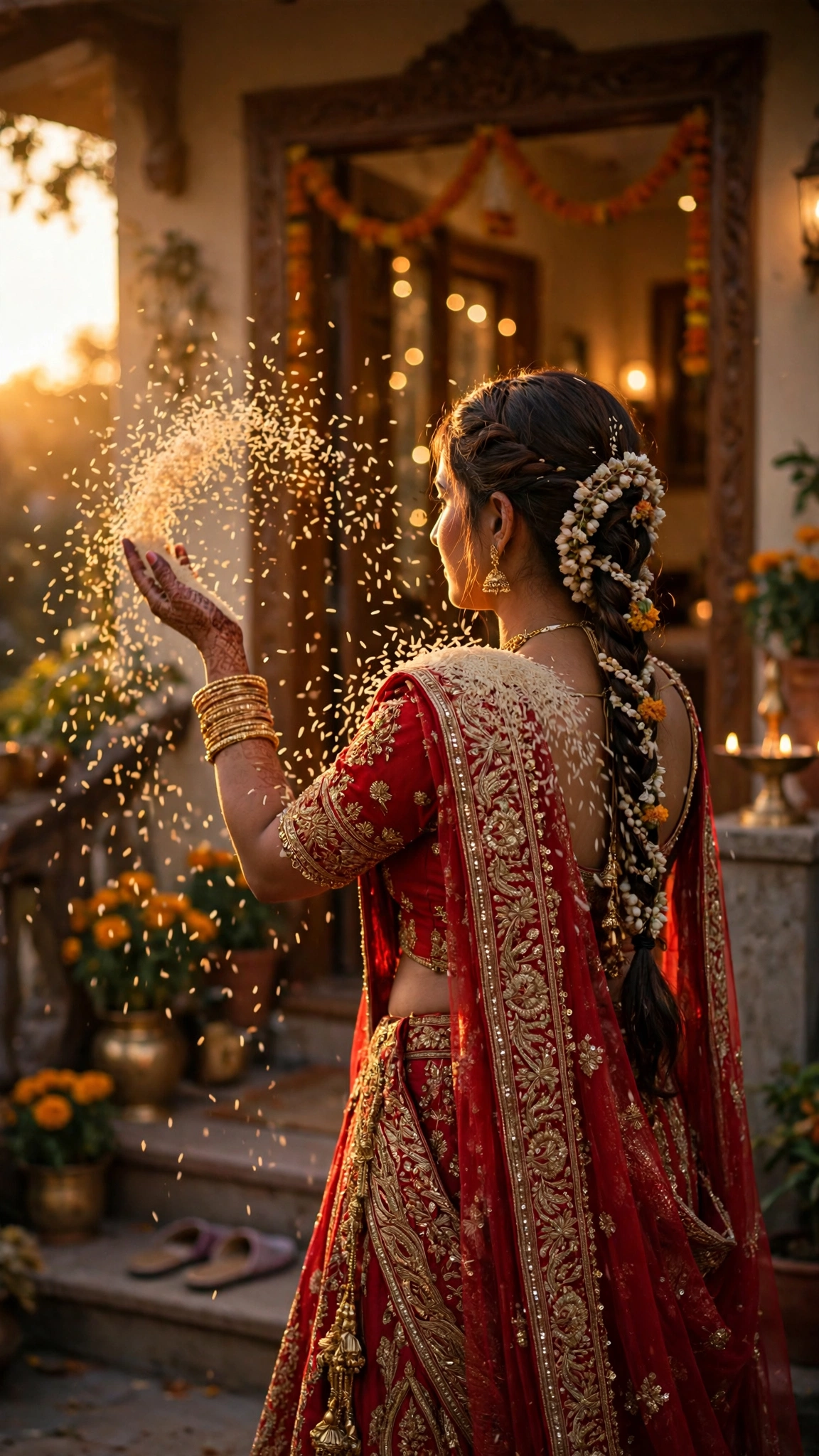
Best for: Symbolic vidaai posts, candid wedding photos, and traditional ceremony portraits.
Customize it: Rice is hard for AI tools to render perfectly, so check the grains closely before posting, and regenerate if anything looks unnatural.
3. Vidaai Bride and Father Portrait
The hug every father remembers: the bride with her father, his hand on her shoulder or holding her hand, in the last quiet moment before she leaves.
AI Prompt:
Edit our uploaded photo into a realistic vidaai bride and father portrait. Preserve both faces, facial features, natural skin tones, and identities exactly, without merging faces. Place the bride in her red bridal lehenga beside her father, his hand gently on her shoulder, both sharing a quiet, emotional moment at the family home entrance, with soft warm light and simple, uncluttered decorations in the background. Use soft warm light, realistic fabric texture, natural skin texture, and a vertical 9:16 composition. Make it look like a candid wedding photograph, not an illustration. No text, no logo, no watermark.
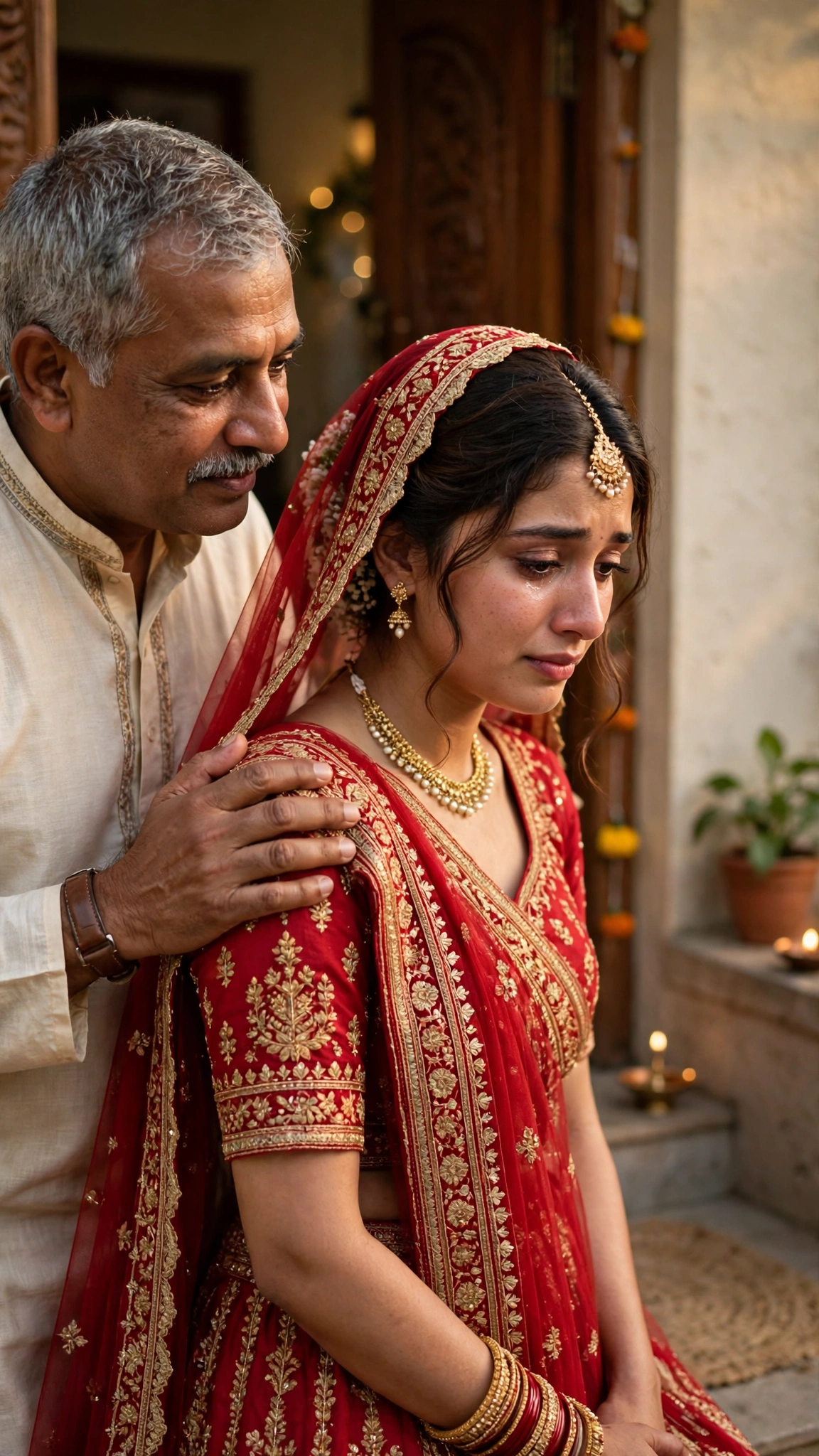
Best for: Family posts, father-daughter photos, and the most treasured vidaai portrait.
Customize it: Use a photo where both faces are clearly visible; the AI needs each face to keep them distinct, and this is not a portrait to rush.
4. Vidaai Couple Departure Portrait
The bride and groom together as they leave — her hand in his, the farewell behind them and their new life ahead, hopeful rather than sad.
AI Prompt:
Edit our uploaded couple photo into a realistic vidaai couple departure portrait. Preserve both faces, facial features, natural skin tones, and identities exactly, without merging faces. Place the bride in her red bridal lehenga and the groom in a cream or ivory sherwani walking gently together towards a decorated car, her hand in his, with soft warm evening light and a family home entrance softly blurred behind them. Use soft warm evening light, realistic fabric and jewellery texture, natural skin texture, and a vertical 9:16 composition. Make it look like a candid wedding photograph, not an illustration. No text, no logo, no watermark.

Best for: Couple DPs, departure posts, and hopeful vidaai portraits.
Customize it: Keep the mood gentle, not celebratory — this is a farewell, and a quiet smile suits it better than a big grin.
5. Vidaai Family Blessing Portrait
The whole family together, hands raised in blessing or gathered close around the bride, the kind of photo that belongs in a family album.
AI Prompt:
Edit our uploaded family photo into a realistic vidaai family blessing portrait. Preserve every face, facial feature, natural skin tone, and identity exactly, without merging faces. Place the bride in her red bridal lehenga in the centre, surrounded closely by her family with hands raised gently in blessing, in a warm family home with soft golden light and simple marigold decorations in the background, everyone with soft, loving expressions. Use soft warm light, realistic skin texture, natural poses, and a vertical 9:16 composition. Make it look like a candid wedding photograph, not an illustration. No text, no logo, no watermark.
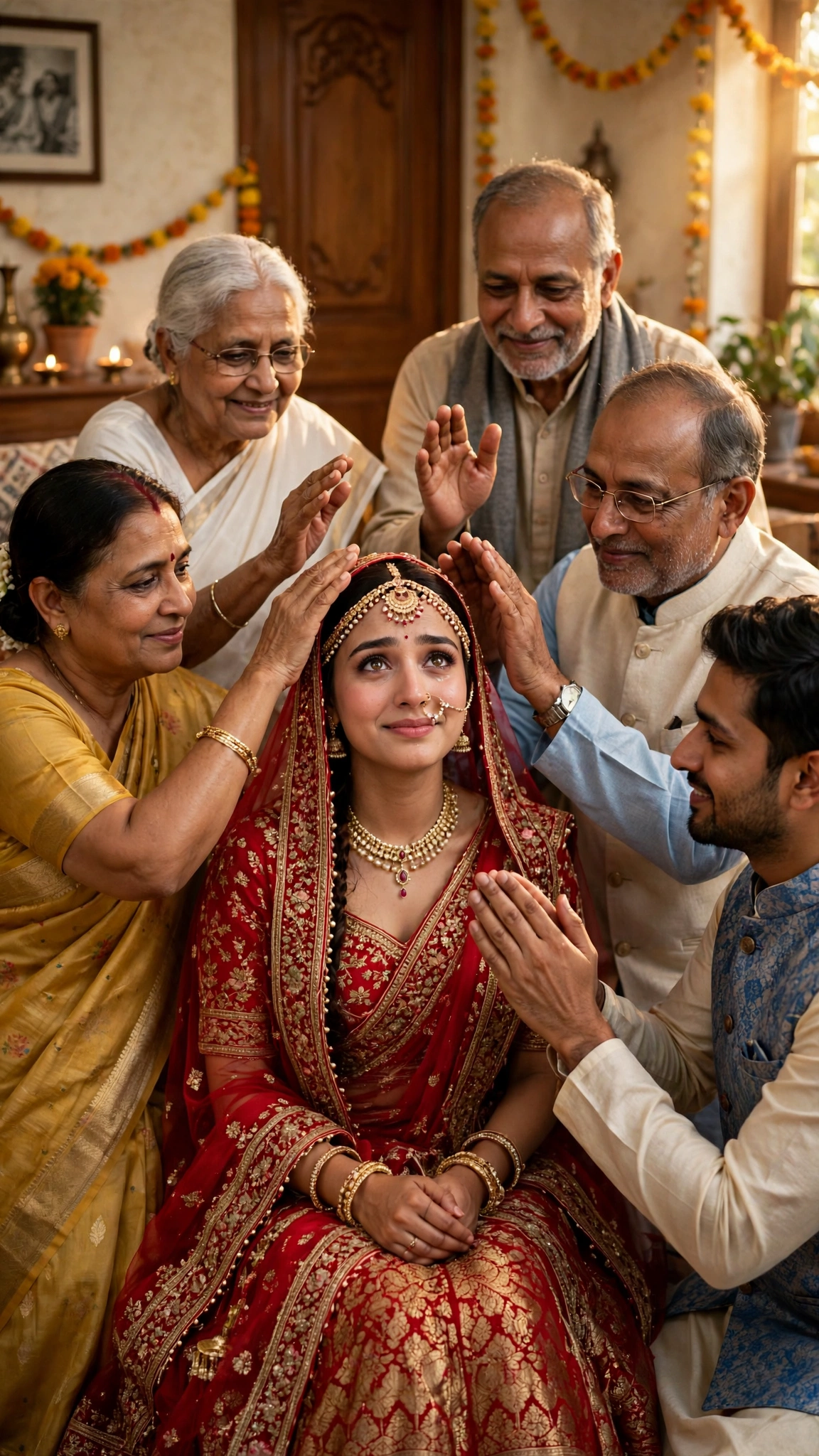
Best for: Family posts, blessing photos, and group vidaai portraits.
Customize it: Use a family photo where no one is hidden behind someone else; the AI needs every face clearly visible to keep them distinct.
6. Vidaai Doli Departure Portrait
The traditional doli farewell: the bride seated in or beside a decorated doli or palanquin, a portrait that honours the older customs of the farewell.
AI Prompt:
Edit my uploaded photo into a realistic vidaai doli departure portrait. Preserve my actual face, facial features, skin tone, and identity exactly. Show me in my red bridal lehenga seated gracefully in a beautifully decorated traditional doli with marigold flowers and soft drapes, with family members standing gently nearby, in soft golden daylight outside the family home. Use soft golden daylight, realistic flower and fabric texture, natural skin texture, and a vertical 9:16 composition. Make it look like a candid wedding photograph, not an illustration. No text, no logo, no watermark.
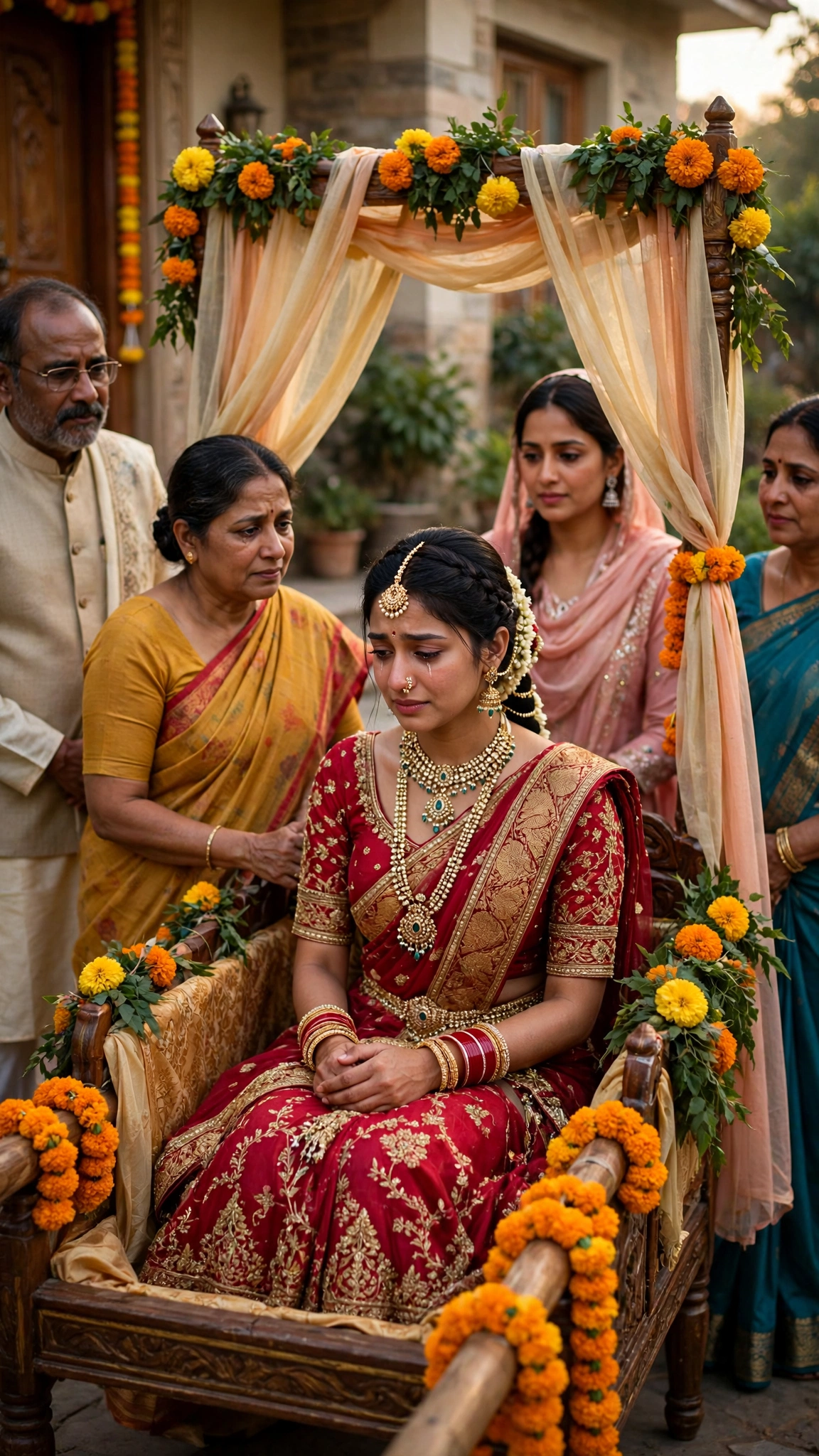
Best for: Traditional vidaai posts, doli ceremony photos, and cultural portraits.
Customize it: Keep the doli decoration elegant and simple in the background, so your face and the emotion of the moment stay the focus.
7. Vidaai Evening Farewell Portrait
A quiet, reflective portrait at dusk: the bride alone in the soft evening light, a moment of calm after the emotion of the farewell.
AI Prompt:
Edit my uploaded photo into a realistic vidaai evening farewell portrait. Preserve my actual face, facial features, skin tone, and identity exactly. Place me in my red bridal lehenga standing quietly in soft evening light near the entrance of the family home, my expression calm and reflective, with warm lamps glowing gently and marigold decorations softly blurred in the background. Use soft warm evening light, realistic fabric and jewellery texture, natural skin texture, and a vertical 9:16 composition. Make it look like a candid wedding photograph, not an illustration. No text, no logo, no watermark.
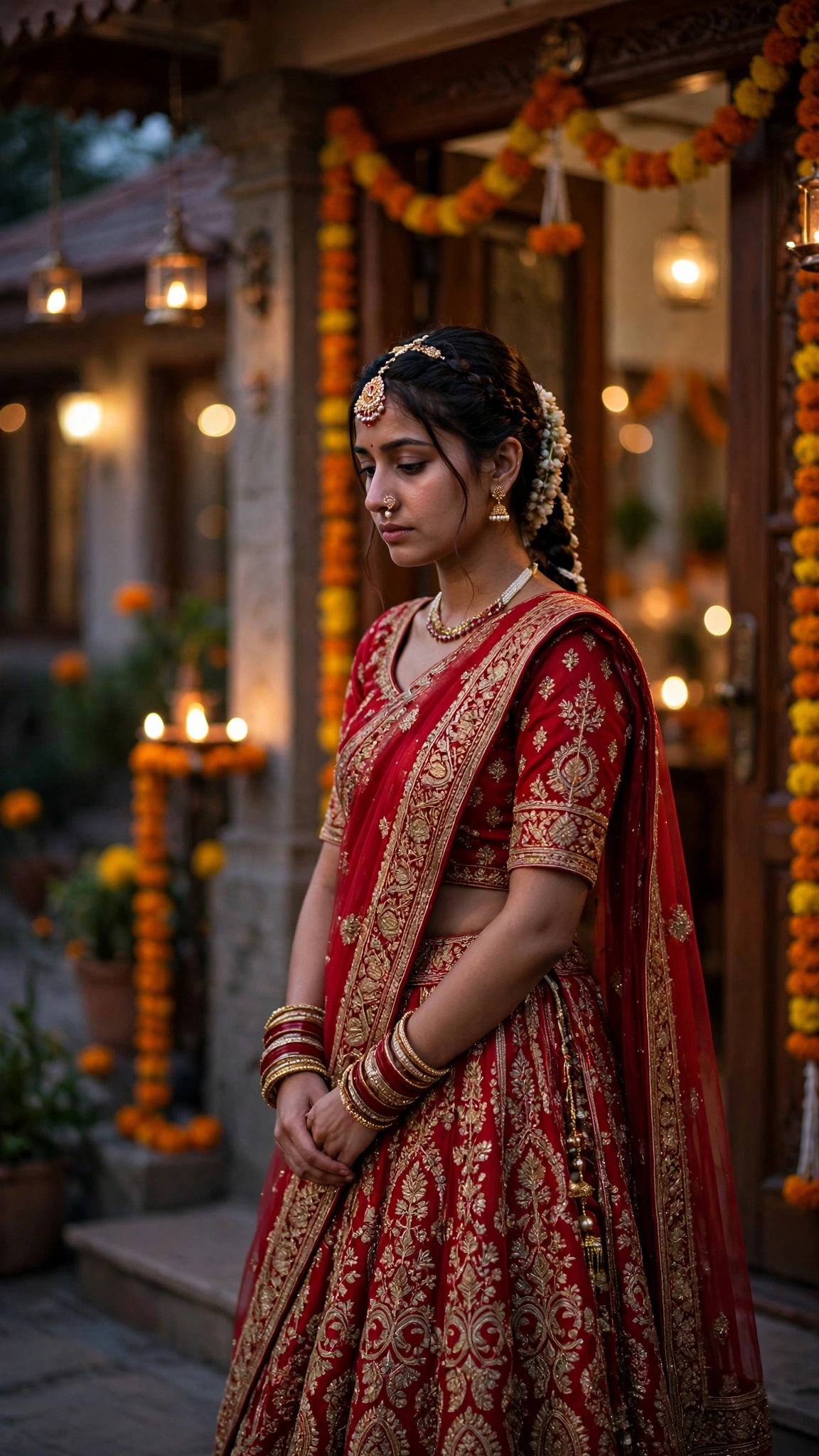
Best for: Elegant DPs, reflective posts, and quiet evening vidaai portraits.
Customize it: Evening light is forgiving, but a face in deep shadow can look dull; start with a photo where your face is well lit.
How to Use These Vidaai Prompts in Gemini or ChatGPT
- Choose a clear photo. A front-facing, well-lit photo works best. Avoid blurry photos or photos where your face is covered. Use the original from your gallery, not a WhatsApp-forwarded copy.
- Open Gemini or ChatGPT and start a new image chat.
- Upload your photo first, then paste the full prompt in the same message.
- Keep one prompt at a time. Do not mix an embrace look, a rice throwing look, and a doli look in one prompt.
- Generate, then refine. If the face looks slightly off, do not rewrite everything. Add one correction line, for example: “Keep my face exactly the same as the uploaded photo and make the lighting softer.”
If Your Vidaai Photo Looks Wrong, Fix It Like This
| Problem | Add this line |
|---|---|
| Face looks different | Keep my face, facial features, and skin tone exactly the same as the uploaded photo. |
| Photo looks too bright or party-like | Use soft, warm, gentle light and a quiet, tender mood, not a celebration look. |
| Hands or jewellery look wrong | Use natural hand positions with correct fingers and realistic jewellery. |
| Rice looks unnatural | Show a small handful of realistic rice grains, softly blurred, not too many. |
| Background is too busy | Keep the background softly blurred and simple, and keep the focus on the person. |
| Expression looks too cheerful | Use a soft, gentle, emotional expression, like a quiet farewell. |
Tips for Natural-Looking Vidaai Photos
- Use one clear photo. A front-facing photo with even light works better than a side profile or a group crop.
- Keep the mood tender. Vidaai is a farewell, not a party. Soft expressions, gentle poses, and warm light suit it far better than loud colours or dramatic effects.
- Check the hands and jewellery. AI tools sometimes struggle with hands, bangles, and fine jewellery; if anything looks odd, regenerate the image.
- Keep the background simple. A doorway, a few marigolds, and warm light are enough. Too much decoration can crowd the photo and pull attention away from your face.
- Check the rice and the doli. Small details like rice grains and marigold drapes are where AI tools fail most, so look closely before you post.
- Stay honest in captions. These are AI-edited photos. If you share one as a real memory, say so, so family and friends are not misled.
FAQs
Can I use these vidaai prompts in both Gemini and ChatGPT?
Yes. Both tools accept an uploaded photo plus a pasted text prompt. The wording is written to work in either app, though results vary slightly between tools, so try the same prompt in both if the first result is not right.
Will the AI keep my real face?
That is the goal of the “preserve my face” line in every prompt, and it usually works well with a clear starting photo. It is not perfect every time, so check the result closely before posting, especially around the eyes, smile, and hairline.
What is vidaai, and when does it happen in a wedding?
Vidaai, also spelled bidaai, is the bride’s farewell at the end of a North Indian Hindu wedding. It follows the kanyadaan and the seven phere, when the bride leaves her parents’ home to begin life with her husband. The bride throws rice or coins back over her shoulder without looking back, her family embraces her, and the groom’s family escorts her to the car or exit.
What is the difference between vidaai, doli, and rukhsati?
They are closely related farewells from different traditions. Vidaai is the North Indian Hindu farewell, doli is the Punjabi farewell in which the bride departs in a decorated palanquin, and rukhsati is the Muslim farewell. All three mark the same moment: a bride leaving her parents’ home.
Which vidaai prompt is best for a DP?
Prompt 1, the Vidaai Farewell Embrace Portrait, is the most emotional choice for a DP, because it is tender and instantly recognizable as a vidaai moment. Prompt 7, the Evening Farewell Portrait, is best if you want something quieter and more elegant.
Which prompt is best for a photo with my father?
Prompt 3, the Vidaai Bride and Father Portrait, is made for that hug. Upload a clear photo where both faces are fully visible, and do not crop either face tightly.
Do these prompts cost money?
Gemini and ChatGPT both offer free tiers, but image generation limits and features change often. Check the app you use for its current free limits before you start; this article does not promise any free quota.
Can I use these photos for a shop or a business page?
These prompts are written for personal wedding photos with your family. For business or advertising use, check the terms of the AI tool you use, avoid brand logos, and do not imply an endorsement that is not real.
Is it safe to upload my wedding photo to an AI tool?
Upload only photos you are comfortable sharing with that tool, and check the tool’s privacy settings. Do not upload photos of other people without their permission, and be careful with photos of children or elderly family members.
For Readers in India
Vidaai is one of those moments every Indian family knows, whether you are in Delhi, Mumbai, Lucknow, or a small town. You do not need a studio or a professional photographer to keep it well. These prompts work the same way wherever you are — upload your photo, paste the prompt, and use a home setting with warm light. A doorway, a few marigolds, and the people you love are enough to get the look right.
If you are a bride, use Prompt 1 or Prompt 3 for the photo you will keep closest — the embrace, and the hug with your father. If you are a sister or a mother helping with the wedding, use Prompt 5 for the family blessing photo that belongs in the album. And if you are posting for family on WhatsApp, a simple caption in your own words works better than changing the prompt itself — something like “Vidaai — the hardest goodbye of the day” says more than any filter ever could.
Originality and Privacy Note
These prompts were written originally for this site. They are not copied from another prompt site, and they do not copy any celebrity’s face or a movie scene. Results vary by tool and by photo, and no prompt can guarantee a viral result. Upload only your own photo, or a photo you have permission to edit. Do not upload anyone else’s photo without their permission, and do not use these prompts to create a photo that pretends to be a real celebration you did not take part in.
Final Thoughts
Vidaai photos work best when they stay tender: soft light, a gentle expression, a doorway, a few marigolds, and the people you love most gathered close. That is what I kept coming back to while writing these prompts, and it is what I would check first in my own photo. Pick the prompt that matches your moment — the farewell embrace for the most emotional photo, the rice throwing for the symbolic one, the bride and father portrait for the hug you will never forget, or the evening farewell for something quiet and reflective. Upload a clear photo, paste the prompt in full, and check the hands, the jewellery, and your face before you post.
Read more: Baraat AI Photo Editing Prompts, Gemini Couple Photo Editing Prompts, Diwali AI Photo Editing Prompts, Winter AI Photo Editing Prompts
One Comment