
Hanukkah AI Photo Editing Prompts: 7 Copy-Paste Gemini & ChatGPT Prompts
Hanukkah is not a festival most of us in India grew up celebrating, and I want to be honest about that right at the start. It is a Jewish festival, the Festival of Lights, celebrated over eight nights. In 2026, it begins at sundown on Friday, December 4, and ends at nightfall on Saturday, December 12. Each evening, one more candle is lit on the menorah — the nine-branched candelabrum, with eight candles for the eight nights and one helper candle, the shamash, used to light the others. Families gather at home, the candles glow in the window, latkes are fried in the kitchen, children play dreidel after dinner, and small gifts are shared across the eight nights.
So why would someone in India want a Hanukkah photo? In my case, it started with friends — Jewish friends living abroad, and Indian friends whose families are spread across countries where Hanukkah is a big home festival. A warm photo with a menorah and candlelight is a simple way to say “thinking of you this festival” on WhatsApp or social media. Some readers may be students or teachers making a post about world festivals, and some may simply like the look: deep blue, gold, and candlelight photographs very differently from the bright colours of Diwali.
One thing I want to say clearly: these prompts are for personal and family photos, written with respect for the holiday and its traditions. I am not Jewish, and I am not presenting these as pictures of a ceremony I took part in. If you are unsure about a detail — for example, how many candles are lit on a given night — check with your family tradition or a trusted guide before posting, rather than relying on the AI image alone. And if you share an AI-edited photo, say so in the caption.
In this article, I am sharing the 7 Hanukkah prompts I actually use, for solo portraits, friends, and family photos. You upload your photo, copy one prompt, and paste it into Gemini or ChatGPT. Every prompt keeps your face recognizable and focuses on realistic candlelight, menorahs, and natural indoor warmth — not a cartoon filter.
Quick Pick: Which Hanukkah Prompt Should You Use?
| Prompt | Best for | Mood |
|---|---|---|
| 1. Menorah Lighting Portrait | Solo, DP and posts | Warm, reverent |
| 2. Cozy Family Dreidel Night Portrait | Family, group posts | Joyful, playful |
| 3. Blue and Gold Evening Portrait | Solo, elegant posts | Elegant, festive |
| 4. Latkes in the Kitchen Portrait | Solo, candid posts | Warm, homey |
| 5. Hanukkah Gift Giving Portrait | Solo, family posts | Cheerful, thoughtful |
| 6. Window Candlelight Portrait | Solo, quiet posts | Soft, peaceful |
| 7. Friends Hanukkah Gathering Portrait | Friends, group posts | Warm, together |
Gemini or ChatGPT — Which One Should I Use for Hanukkah Photos?
This is the question I get most, so here is what I have found by trying the same prompt in both tools. Gemini, from Google, is usually better at keeping a single face consistent. If your main worry is “will it still look like me”, start with Gemini. ChatGPT, from OpenAI, is often stronger on warm detail — the candle glow, the texture of a sweater, the soft blur of lights in the background come out richer. If your main worry is “will the scene feel warm and real”, try ChatGPT.
What I do in practice is simple: I generate the same prompt in Gemini first, and if the face is right but the background feels flat, I try the same prompt in ChatGPT and pick the better one. Both tools need the same thing from you — a clear original photo and the full prompt in one message. Do not upload a photo that WhatsApp already compressed, because the AI then has less detail to work with. Use the original photo from your phone gallery.
One more thing I have learned: do not mix prompts. A menorah portrait, a family dreidel night, and a kitchen photo in one message will confuse both tools. One prompt at a time, one result at a time.
7 Hanukkah AI Photo Editing Prompts
1. Menorah Lighting Portrait
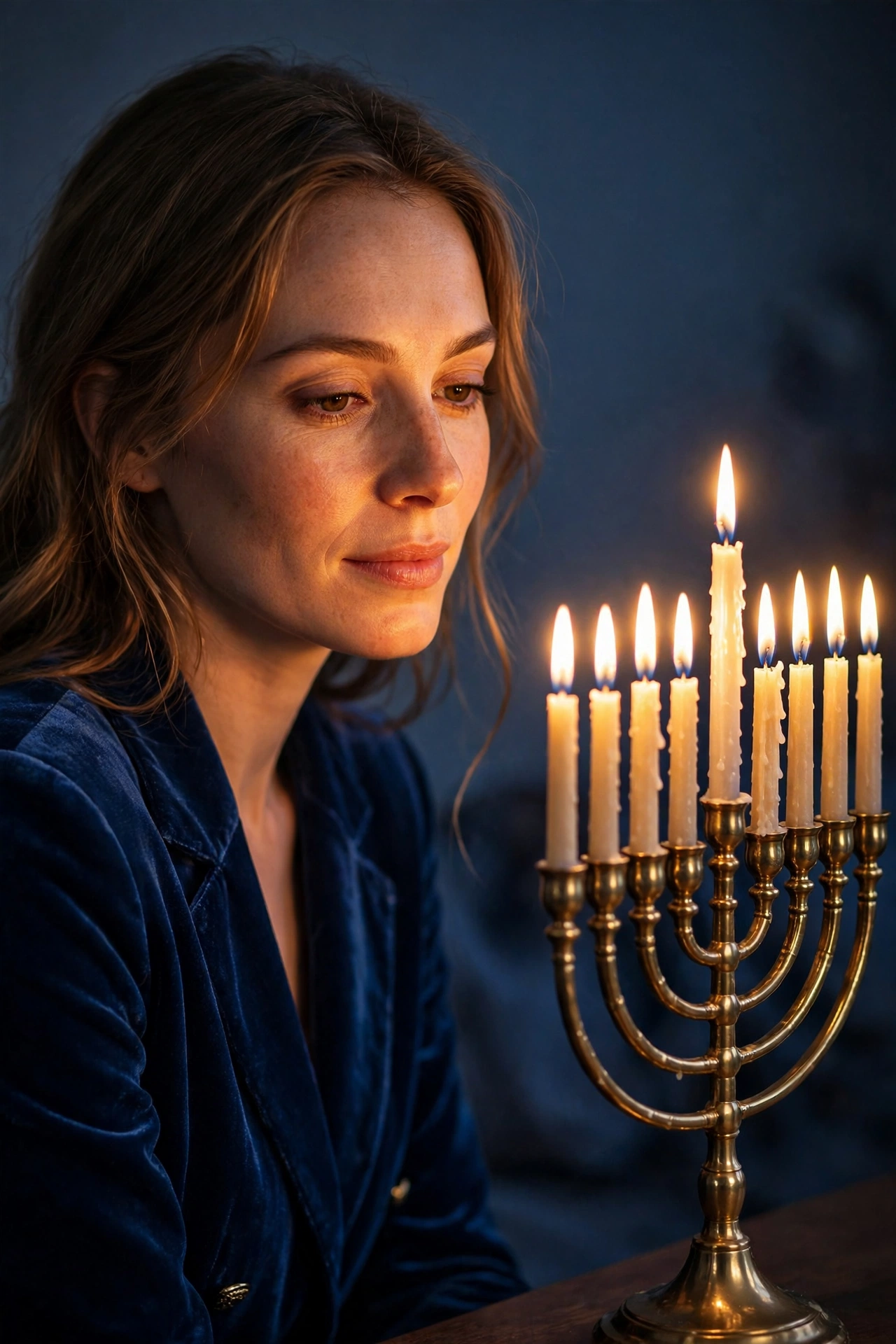
The classic Hanukkah photo: you beside a lit menorah, warm candlelight on your face, deep blue tones around you. This is the prompt I recommend first, because it is the one image that says Hanukkah without needing any caption.
AI Prompt:
Edit my uploaded photo into a realistic Hanukkah menorah lighting portrait. Preserve my actual face, facial features, natural skin tone, and identity exactly. Place me indoors beside a beautiful menorah with lit candles, dressed in an elegant deep blue outfit, with warm candlelight glowing softly on my face and a simple, uncluttered background in deep blue and gold tones. Use warm candlelight, realistic flame and wax texture, natural skin texture, and a vertical 9:16 composition. Make it look like a candid home photograph, not an illustration. No text, no logo, no watermark.
Best for: Hanukkah DP, first-night posts, and profile pictures.
Customize it: Candle flames are delicate in AI images; if a flame looks odd, regenerate rather than posting a photo with a distorted flame near your face.
2. Cozy Family Dreidel Night Portrait
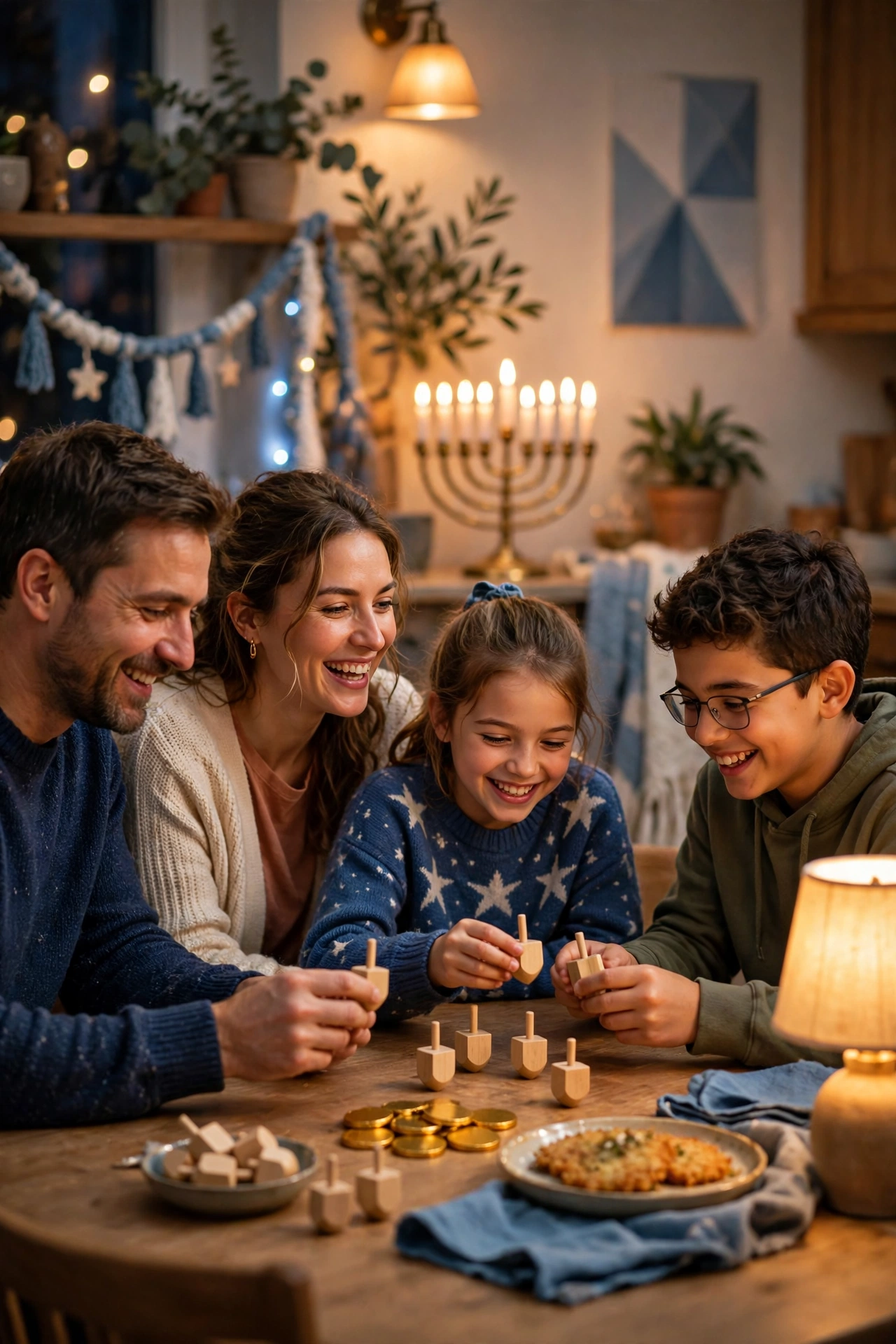
A joyful family photo around a table with a dreidel game, gelt, and warm light after dinner.
AI Prompt:
Edit our uploaded family photo into a realistic Hanukkah family dreidel night portrait. Preserve every face, facial feature, natural skin tone, and identity exactly, without merging faces. Place the family together around a cozy dining table playing dreidel, with a lit menorah glowing softly in the background, warm lamps, and simple festive decorations, everyone relaxed and smiling naturally. Use warm indoor light, realistic skin texture, natural poses, and a vertical 9:16 composition. No text, no logo, no watermark.
Best for: Family posts, holiday greetings, and warm group photos.
Customize it: Use a family photo where every face is clearly visible; the AI needs each face to keep them distinct.
3. Blue and Gold Evening Portrait
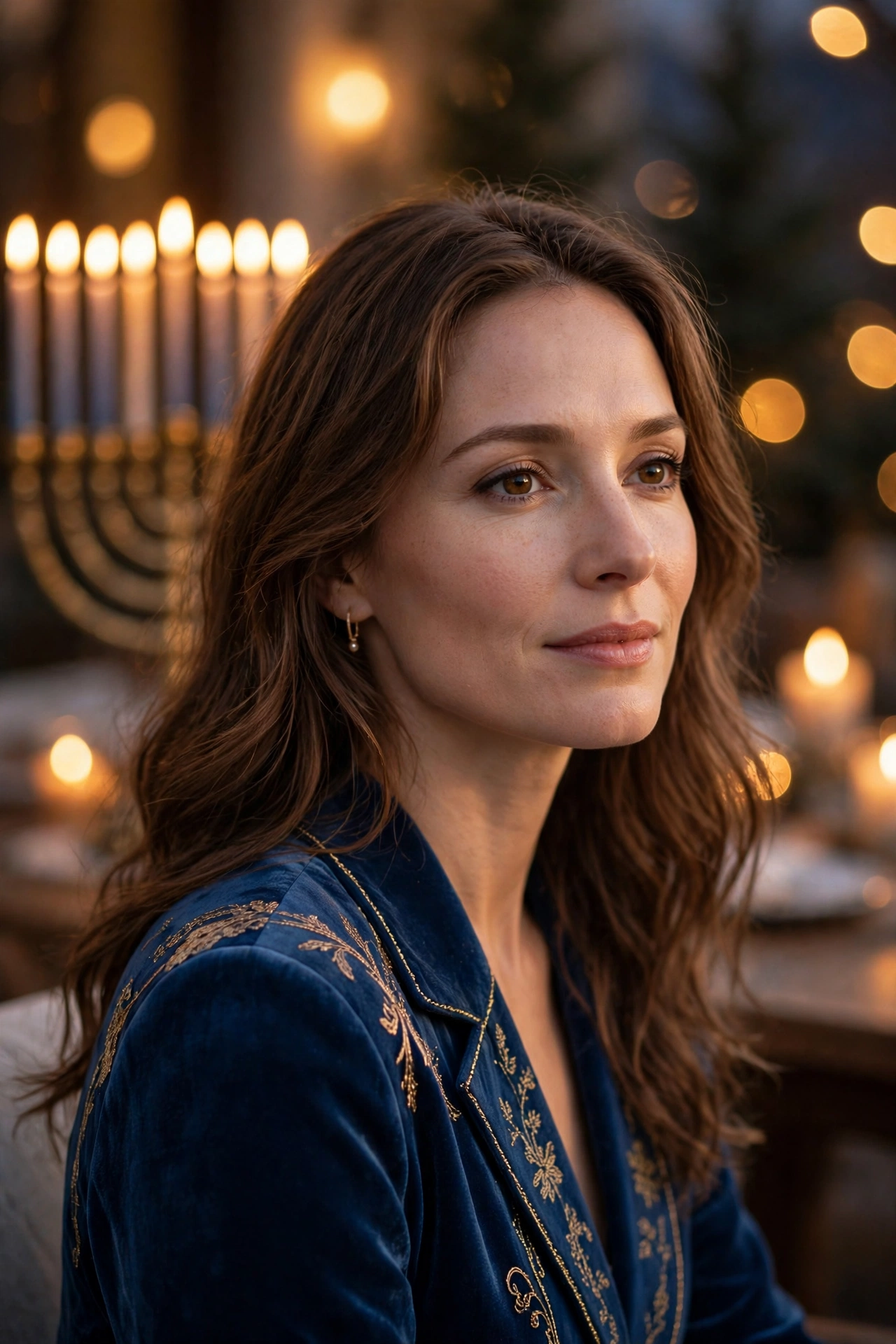
An elegant solo portrait in blue and gold, perfect for a holiday card or a festive profile picture.
AI Prompt:
Edit my uploaded photo into a realistic elegant Hanukkah evening portrait. Preserve my actual face, facial features, skin tone, and identity exactly. Dress me in an elegant deep blue evening outfit with subtle gold accents, and place me indoors against a softly lit background with warm golden lights and a menorah glowing gently behind me, out of focus. Use soft warm evening light, realistic fabric texture, natural skin texture, and a vertical 9:16 composition. Make it look like a professional portrait photograph. No text, no logo, no watermark.
Best for: Holiday cards, elegant DPs, and festive profile pictures.
Customize it: Keep the gold accents subtle; a little gold goes a long way in a portrait, and too much can distract from your face.
4. Latkes in the Kitchen Portrait
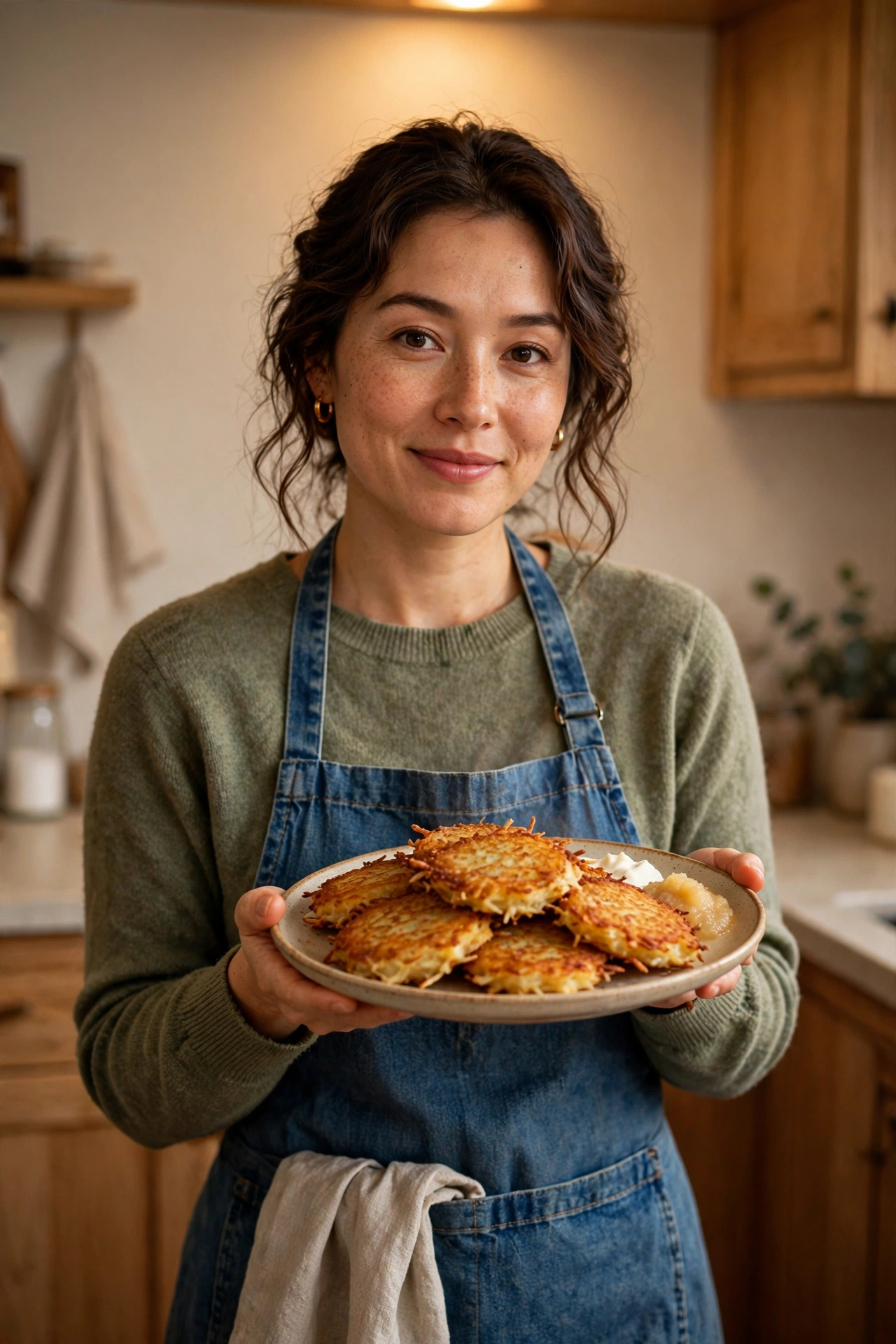
A warm, homey photo of you in the kitchen with a plate of freshly made latkes and soft evening light. Latkes are potato pancakes fried in oil — the oil is part of the festival story.
AI Prompt:
Edit my uploaded photo into a realistic Hanukkah kitchen portrait. Preserve my actual face, facial features, skin tone, and identity exactly. Place me in a cozy home kitchen holding a plate of golden latkes, dressed in a comfortable casual outfit with an apron, with warm kitchen light and a simple uncluttered background. Use warm indoor light, realistic food and fabric texture, natural skin texture, and a vertical 9:16 composition. Make it look like a candid home photograph. No text, no logo, no watermark.
Best for: Food posts, cozy kitchen photos, and warm family-season portraits.
Customize it: Food is hard for AI tools to render perfectly; check the plate closely before posting, and regenerate if anything looks unnatural.
5. Hanukkah Gift Giving Portrait
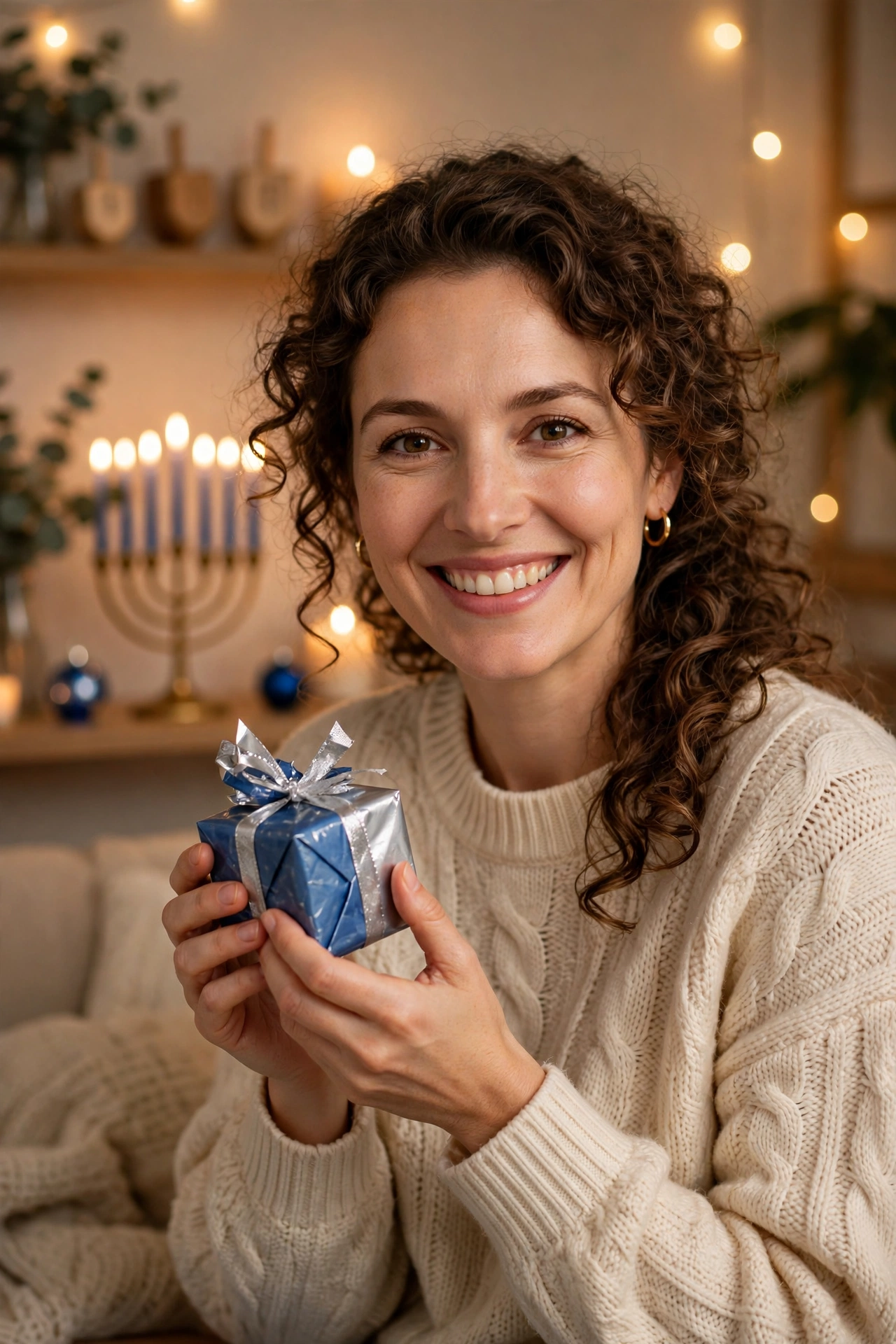
A cheerful photo of you holding a small wrapped gift, with blue and silver wrapping and soft lights behind you. Hanukkah gifts are usually small and spread across the eight nights.
AI Prompt:
Edit my uploaded photo into a realistic Hanukkah gift giving portrait. Preserve my actual face, facial features, skin tone, and identity exactly. Place me indoors holding a small gift wrapped in blue and silver paper, smiling warmly, dressed in a festive but comfortable outfit, with soft holiday lights glowing gently in the background. Use soft warm indoor light, realistic wrapping paper texture, natural skin texture, and a vertical 9:16 composition. Make it look like a candid home photograph. No text, no logo, no watermark.
Best for: Gift posts, holiday greetings, and cheerful seasonal photos.
Customize it: Small gifts photograph better than large ones; one neatly wrapped gift keeps the photo calm and focused.
6. Window Candlelight Portrait
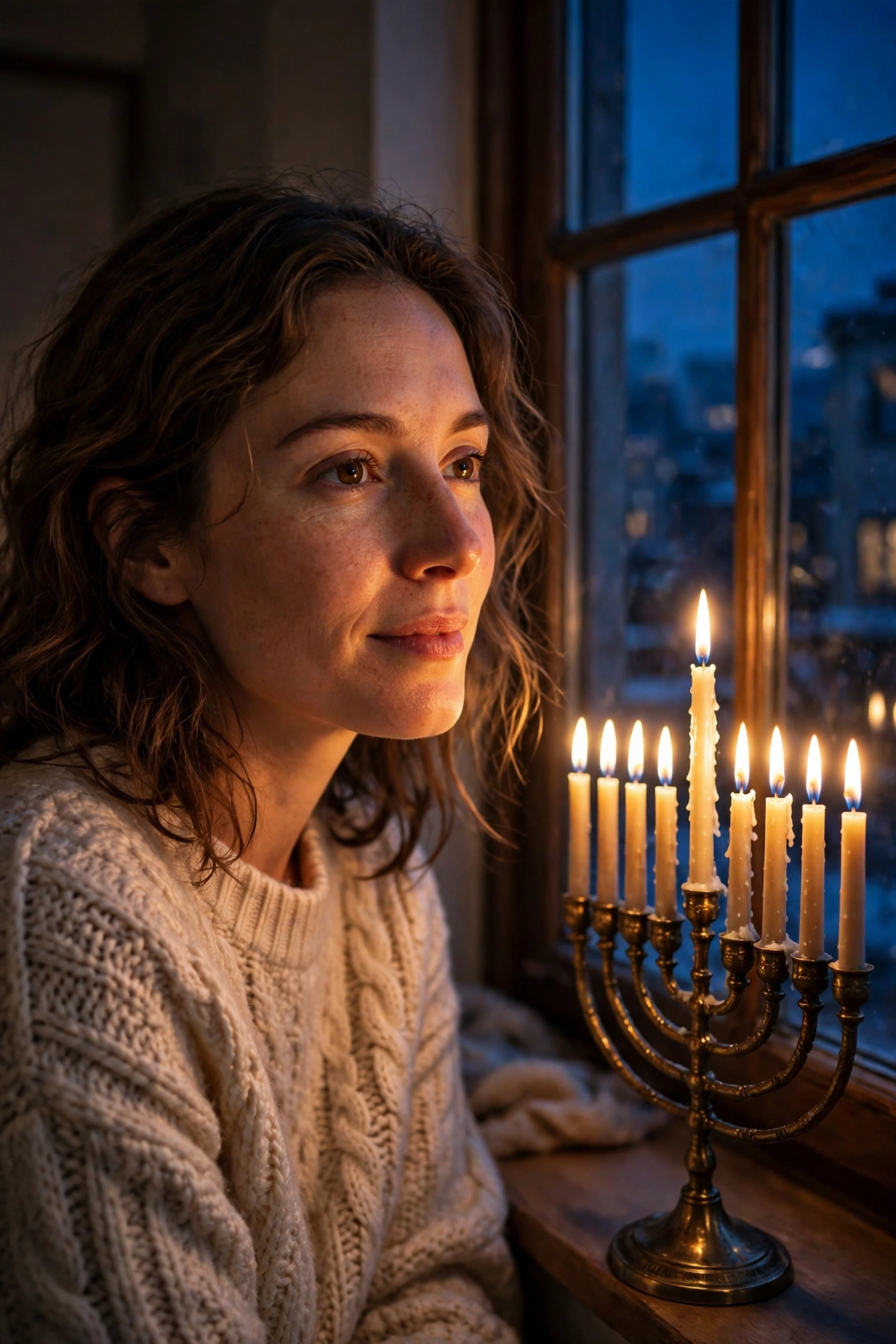
A quiet, peaceful photo: you by a window at night, a menorah glowing beside you, blue evening light outside.
AI Prompt:
Edit my uploaded photo into a realistic Hanukkah window candlelight portrait. Preserve my actual face, facial features, skin tone, and identity exactly. Place me indoors beside a window at night with a lit menorah glowing warmly nearby, dressed in a cozy sweater, with deep blue evening light outside the window and warm candlelight on my face. Use soft candlelight mixed with cool evening light, realistic flame texture, natural skin texture, and a vertical 9:16 composition. Make it look like a candid evening photograph. No text, no logo, no watermark.
Best for: Quiet holiday posts, reflective portraits, and elegant profile pictures.
Customize it: Night photos can turn out dark; if the face is too shadowed, regenerate with a brighter starting photo.
7. Friends Hanukkah Gathering Portrait
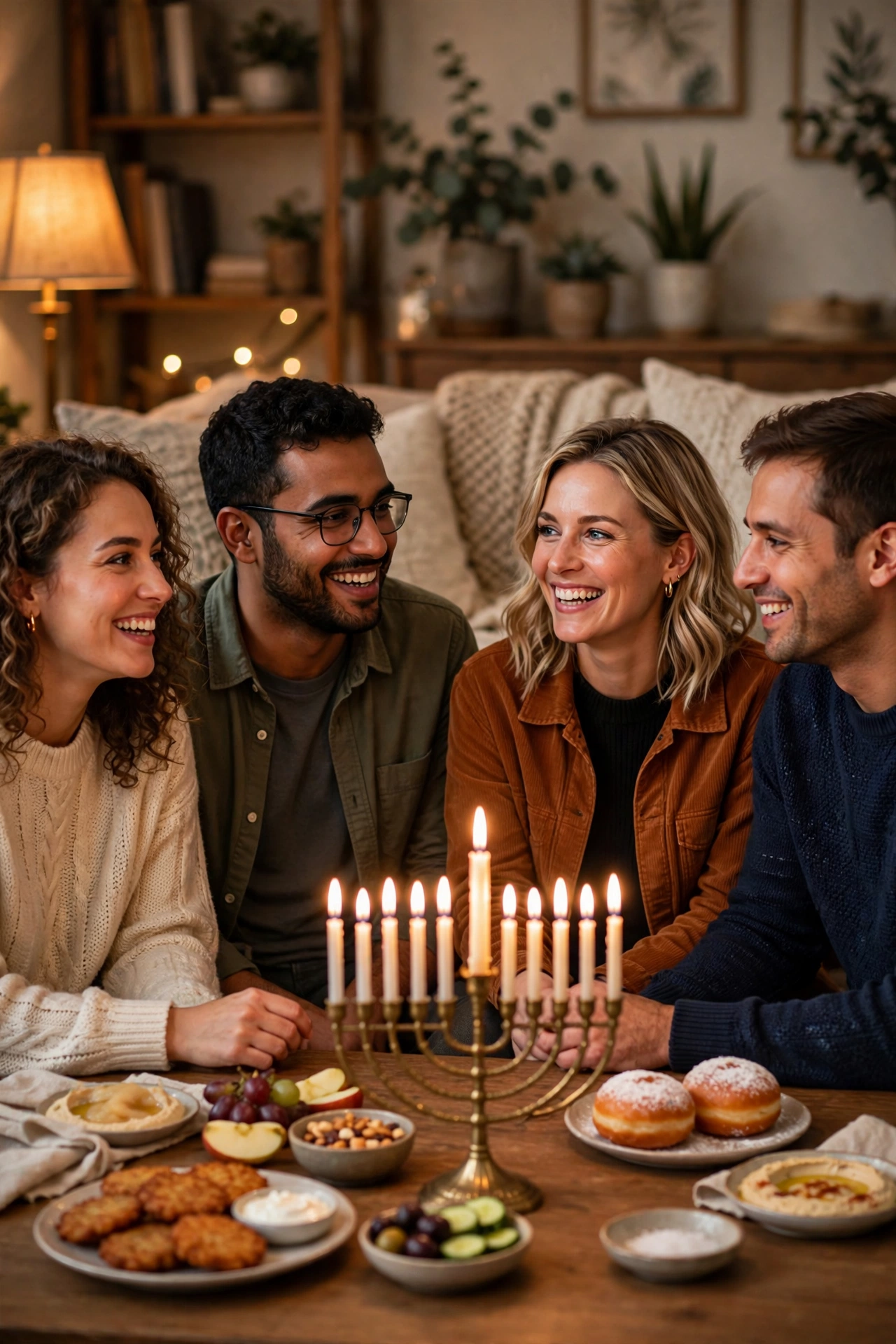
A warm group photo for friends celebrating together, with candles, snacks, and laughter.
AI Prompt:
Edit our uploaded group photo into a realistic Hanukkah friends gathering portrait. Preserve every face, facial feature, natural skin tone, and identity exactly, without merging faces. Place everyone together in a cozy living room with a lit menorah, warm lamps, and a table of simple holiday snacks, all smiling and chatting naturally. Use warm indoor light, realistic skin texture, natural poses, and a vertical 9:16 composition. No text, no logo, no watermark.
Best for: Friends posts, group DPs, and warm gathering photos.
Customize it: Keep the snack table simple and in the background so the friends, not the food, stay the focus of the photo.
How to Use These Hanukkah Prompts in Gemini or ChatGPT
- Choose a clear photo. A front-facing, well-lit photo works best. Avoid blurry photos or photos where your face is covered. Use the original from your gallery, not a WhatsApp-forwarded copy.
- Open Gemini or ChatGPT and start a new image chat.
- Upload your photo first, then paste the full prompt in the same message.
- Keep one prompt at a time. Do not mix a menorah portrait, a dreidel night, and a kitchen photo in one prompt.
- Generate, then refine. If the face looks slightly off, do not rewrite everything. Add one correction line, for example: “Keep my face exactly the same as the uploaded photo and make the lighting softer.”
How I Approach Candlelight Photos (And What Goes Wrong in Low Light)
Candlelight is the whole look of a Hanukkah photo, and it is also the hardest light for AI to get right. Here is what I check before I post anything.
First, the light has to come from one place. In a real room, the menorah is the main light source, so one side of the face is warm and the other falls into soft shadow. When an AI photo lights the face evenly from the front, like a flash photo, it stops looking like candlelight at all. If my result looks flat, I add one line: “Light my face mainly from the menorah on one side, with soft shadow on the other side.”
Second, flames are small and unforgiving. A real candle flame is a steady teardrop shape. AI tools often draw flames that are too big, bent sideways, or doubled, and a wrong flame right next to your face is the first thing anyone notices. I zoom in on every flame before posting. If one looks odd, I regenerate.
Third, the menorah itself needs a quick count. It has nine branches: eight for the nights, plus the helper candle. AI tools do not count well, so I often get seven, ten, or eleven candles. If the count matters for my post, I regenerate, or crop the menorah so the count is not the focus.
Fourth, hands near flames are a weak point. AI tools still struggle with hands, and a hand reaching toward a candle makes it worse. I keep hands away from the flames, and the prompts above are written that way on purpose.
Fifth, low light eats detail. A photo taken in a dark room gives the AI very little to work with, so the face comes out smooth and waxy, like plastic. I always start with a daylight photo, even for a night scene — the AI can darken a bright photo convincingly, but it cannot invent detail from a dark one. If the result looks too dark as a small WhatsApp DP, I regenerate asking for slightly brighter warm light.
Finally, the background should stay quiet. A menorah, a window, and deep blue tones are enough. One setting, one light source, and the people in focus — that is the formula I keep coming back to.
If Your Hanukkah Photo Looks Wrong, Fix It Like This
| Problem | Add this line |
|---|---|
| Face looks different | Keep my face, facial structure, and skin tone exactly the same as the uploaded photo. |
| Photo looks too artificial | Use realistic skin texture, natural shadows, and soft light. Avoid plastic skin and over-smoothing. |
| Flames look wrong | Use small, steady, realistic teardrop flames with natural glow. |
| Menorah has the wrong candle count | Show a menorah with the correct number of lit candles for this night, or crop it so the count is not visible. |
| Hands look wrong | Keep hands away from the flames, with natural positions and correct fingers. |
| Background is too busy | Keep the background softly blurred and keep the focus on the person. |
| Photo is too dark | Use slightly brighter warm candlelight on the face, keeping the evening mood. |
Tips for Natural-Looking Candlelight Photos
- Use one clear photo. A front-facing photo with even light works better than a side profile or a group crop.
- Keep the candle count simple. AI tools do not always count candles correctly, so check the menorah in the result before posting, especially if you are marking a specific night.
- Let the light do the work. Candlelight is the star of a Hanukkah photo; a dark, simple background makes the warm glow stand out.
- Check the hands and flames. AI tools sometimes struggle with hands near flames and with flame shapes; if either looks odd, regenerate the image.
- Stay honest in captions. These are AI-edited photos. If you share one as a real memory, say so, so friends are not misled.
FAQs
What is Hanukkah?
Hanukkah is a Jewish festival, also called the Festival of Lights, celebrated over eight nights. Each evening, one more candle is lit on the menorah. It marks the rededication of the Temple in Jerusalem, and the story told with it is of a small amount of oil that burned for eight days.
When is Hanukkah in 2026?
In 2026, Hanukkah begins at sundown on Friday, December 4, and ends at nightfall on Saturday, December 12. The first candle is lit on the evening of December 4 and the eighth on the evening of Friday, December 11.
What is a menorah, and how many candles does it have?
The Hanukkah menorah, also called a hanukkiah, has nine branches: eight candles for the eight nights, plus a ninth helper candle, the shamash, used to light the others. One more candle is lit each night.
Can I use these prompts if I am not Jewish?
Yes, for personal photos and greetings, as long as you use them respectfully. These prompts are made for festive portraits and holiday greetings, not for pretending to take part in a religious ceremony. If you are posting for a Jewish friend, a simple “Happy Hanukkah” caption with an honest note that the photo is AI-edited is the respectful way to do it.
Can I use these prompts in both Gemini and ChatGPT?
Yes. Both tools accept an uploaded photo plus a pasted text prompt. Results vary slightly between tools, so try the same prompt in both if the first result is not right.
Will the AI keep my real face?
That is the goal of the “preserve my face” line in every prompt, and it usually works well with a clear starting photo. It is not perfect every time, so check the result closely before posting, especially around the eyes, smile, and hairline.
What are latkes and dreidel?
Latkes are potato pancakes fried in oil, eaten during Hanukkah — the oil connects to the festival story. A dreidel is a small four-sided spinning top used in a traditional Hanukkah game, usually played with chocolate coins called gelt.
Do these prompts cost money?
Both offer free tiers, but image limits change often. Check the app you use for its current free limits before you start.
Can I use these photos for a shop or a business page?
These prompts are written for personal and family photos. For business use, check the terms of the AI tool you use and avoid brand logos.
What if the menorah in the image has the wrong number of candles?
AI tools often get small counts wrong. If the count matters for your post, check the image carefully, regenerate it, or crop the menorah so the count is not the focus of the photo.
For Readers in India
Hanukkah is not widely celebrated in India, and I am not going to pretend it is. India has small Jewish communities, in cities like Mumbai and Kochi among others, but for most of us this is a festival we know through friends, family abroad, or school and college. That is why I wrote this article as an explainer first and a prompt list second, so nobody has to guess what a menorah is or why the candles matter.
If you are in India and using these prompts, here is what works in practice. A greeting photo for a Jewish friend or colleague abroad is the most natural use — send it on WhatsApp with a simple “Happy Hanukkah” and it lands well, because it shows you made the effort to learn what the festival is. If you are a student or teacher making a post about world festivals, the menorah portrait and the window candlelight portrait are the two that explain the festival in a single image.
The setting does not need anything special. These prompts are written for an ordinary home — a dining table, a kitchen, a window at night — not a studio. Upload your photo, paste the prompt, and keep the caption honest about it being AI-edited.
Originality and Privacy Note
These prompts were written originally for this site. They are not copied from another prompt site, and they do not copy any celebrity’s face or a movie scene. Results vary by tool and by photo, and no prompt can guarantee a viral result. Upload only your own photo, or a photo you have permission to edit.
Final Thoughts
Hanukkah photos work best when they stay simple: warm candlelight, deep blue and gold, and the people you celebrate with. That is even more true when the festival is new to you — a simple, respectful photo says more than a busy one full of details you are not sure about. Pick the prompt that matches your mood — the menorah portrait for a classic DP, the dreidel night for a family post, or the window candlelight portrait for something quiet and beautiful — upload a clear photo, and paste the prompt in full. Check the candles, the flames, and your face before you post.
Read more: Christmas AI Photo Editing Prompts, Winter AI Photo Editing Prompts, New Year AI Photo Editing Prompts
One Comment